The Register® — Biting the hand that feeds IT

Feeds

Windows 7: Microsoft's three missed opportunities

At least it's not Vista

  • print
  • alert

Cloud based data management

The verdict is in: Windows 7 is a job well done. Yes, there will be a few Windows XP diehards and those who've fled to OS X and have no intention of returning, but overall Windows 7 is more responsive, prettier, and more usable than Windows Vista.

That said, it is not perfect, and Windows 7 comes with its own set of annoyances and missed opportunities. Here are three of the biggest.

First is multi-touch. It is a big deal, since in the post-iPhone world the advantages of controlling a touchable device without the clutter of a stylus have sunk home. Microsoft claims it has made "touch a first-class way to interact with your PC alongside the mouse and keyboard", according to the official Engineering Windows blog.

It is true that the foundations are laid, with a touch gesture API that means there is no barrier to developers writing excellent touch-control applications, and this will further improve in the forthcoming .NET 4.0.

But has Microsoft made Windows itself touch-friendly? I tried Dell's Latitude XT2, one of the few currently available Tablet PCs with a multi-touch display, and installed Windows 7. I had no quibble with the hardware, once the latest driver from N-Trig was installed, and scrolling up and down in Internet Explorer with a sweep of the finger is a good party trick, complete with inertia effects.
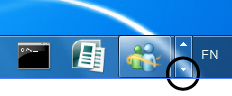
Windows 7 taskbar

Can you stab it: a crowded Windows 7 task bar

Unfortunately, the fun soon wears off if you try to use Windows without keyboard, mouse or stylus. Microsoft has only gone half-way. The taskbar is a delight for touch users, until it fills up and you try to stab a tiny scroll arrow with your finger. The on-screen keyboard is not bad, except that it does not always pop-up when you need it - the Sticky Notes application is an example - and dragging it into view is a hassle. With practice you can get around, but it is not the delight that it should be.

The problem is that Windows needs more applications and utilities designed specifically for touch. These will come, eventually, if multi-touch Windows gains sufficient momentum. However, it risks ending up in the same expensive niche that has afflicted the Tablet PC, or being sidelined by something like the rumored Apple Tablet, if that turns out to do a better job for usability.

Notifications alert

The second big issue is Microsoft's revised notification area. I've been working with the final build for a few weeks and watching other users, and - frankly - I have strong doubts about what Microsoft has done.

SaaS data loss: The problem you didn’t know you had

@Fraser

Derived from 70's OS: CP/M Drive letters - Check

"Marketing prevails over engineering

Even though its roots go back to the 1970's, the Windows NT product line is a big improvement over Microsoft's DOS-based products. Unfortunately that doesn't automatically mean that it's a well-designed operating system.

Cutler's team had to operate within Microsoft's additional design restrictions, and the result was a tradeoff. Cutler took a number of design principles from VMS, which was good. They expanded on that, so in a way NT can be said to contain at least some "New Technology" and perhaps Cutler's work even represented (dare I say it?) some innovation, in that it brought robust design principles to the IBM PC platform. Had that been all, the end result could have been a good, efficient and robust OS. But Gates needed a vehicle that would further Microsoft's marketing strategies, rather than a robust OS. And of course much of the eventual coding on NT was done by Microsoft engineers, so in the end the quality of NT's final code wasn't even in the same league as VMS.

VMS was an industrial-strength operating system with native clustering, but NT was to be a single-user desktop operating system. Account and data management were rudimentary; the user home directory resided on the workstation's local harddisk, under the subdirectory that held the bulk of the operating system code. Applications and user settings were system-based rather than account-based. Separation between OS code, user settings, application code and configuration data became all but impossible; application and GUI settings were stored along with vital operating system information in an insecure central registry that was also system-based. Therefore network-based user accounts could only be implemented with complex and cumbersome workarounds. One of the biggest design mistakes in the history of Windows (the design of the DLL subsystem) was perpetuated, and networking was initially based on the hopelessly inadequate NetBEUI protocol. Even though NT followed a peer-to-peer networking model, a separate "NT Server" version was shipped. (NT Server contained exactly the same code as NT Workstation, with a few additions that amount to only a fraction of the product's total code set.) Initially there had been intentions of portability to non-Intel hardware, the incorporation of a Hardware Abstraction Layer, and versions of Windows NT on Digital and other platforms, but as the market became more and more monolithic these good intentions fell by the wayside. Eventually Digital did the same.

So at the end of the day Microsoft's marketing prevailed over Cutler's engineering. The result wasn't pretty. NT became an OS based on a set of old VMS design principles that were made compatible with everything that Microsoft had ever done wrong. It was full of legacy API's, it was kludged up to run applications written for OS/2 1.0 (but not very well), it paid lip service to POSIX but never offered anything more than fractional POSIX compliance, and it sported a Windows 3 GUI that had its roots in both Apple's and IBM's user interfaces. It even contained the entire Windows 3 kernel and the bulk of its accompanying code (and Windows XP still does) in the original 16-bit executables, as well as the complete set of decades-old DOS code. In short, it was a real Microsoft product. All later versions of Windows that descended from this piece of "New Technology", right up to Windows Vista, suffer from this legacy."

http://www.vanwensveen.nl/rants/microsoft/IhateMS_1.html

Portability: MS (+ Intel) bully Asus into withdrawing their ARM based netbook from show: Because MS is no longer able to port Windows away from x86

"It doesn't have major architectural problems"

The registry alone is a Major Architectural Problem. There are many others.

"It has a superior security model to that of *nix, being based on VMS"

OK, that is just such an insane comment that I don't know where to begin. How about a complete and utter lack of separation between system, application and user code/data? That also counts as one of the other Major Architectural Problems BTW. Also see previous quote re: Gates pissing away the strengths of VMS in order to attain his marketing goals.

"It is highly reliable, although early versions weren't all that."

Tell that to any windows admin on "patch tuesday"

However, I don't expect to persuade you, you've clearly drunk deeply from the koolaid and are concerned that your MCSE will become worthless if enough people come to learn the truth behind the failed abortion that is Windows.

Good luck with that.

P.S. I've been using MS products since Multiplan and MS BASIC on CP/M so I know how much they suck compared to alternatives and I assure you they suck hard. Supercharged V8 hard.

1
0

@blank passwords

"Even if you don't want to bother with a log in password being able to make dramatic changes to windows by just clicking yes on UAC is a mistake as well. The OSX model of asking for a password for any big changes even if you don't use a password to log in is much better"

No, it really really isn't. Spoofing the Mac OS X dialog and stealing the user's password is trivial. There is no point spoofing the Vista UAC prompt, because it's just a yes/no choice. Getting someone to click on a fake "yes" button doesn't get you anywhere.

0
0

re: file extension blx

I am getting really sick of this stupid file extension whinge, ffs if you understand pc's you know how to turn file extensions on and if you don't understand pc's even if you can see the file is called .doc.exe that will not stop you be stupid enough to click on it

also a huge percentage of problems with malware are caused by people quite wilfully installing software becuase it was cracked / free and letting people see file extensions will not stop this

as pointed out by everybody else Win+R brings up ruyn just file and although I agree it should have been left in it is not really a big problem

also personally I quite like the new taskbar and am not so blind that I cannot see the big square around programs that are running , if you want another window just hold down shift and then click on the icon.

human's are created to learn new stuff , get used to it and stop whining about minor petty changes

0
0

More from The Register

Nuke plants to rely on PDP-11 code UNTIL 2050!
Programmers and their walking sticks converge in Canada
Bjarne Again: Hallelujah for C++
Plus: Now officially OK to admit you never used STL algorithms
Interwebs taunt Sir Jony over Apple eye candy makeover
Hey Ive, Ive... add more unicorns, willya?
SCO vs. IBM battle resumes over ownership of Unix
Zombie lawsuit back and wants to suck the brains out of Linux
Red Hat to ditch MySQL for MariaDB in RHEL 7
So long, Oracle! Don't let the door hit you on the way out
Shy? Socially inadequate? Fiddling with your phone could help
App 'tells the brutal truth' about social inadequates' chatup lines
Java EE 7 melds HTML5 with enterprise apps
New release arrives with GlassFish, NetBeans support
 breaking news
'Office Facebook' firm Tibbr wants you to PAY for mobe-meetings app
Great idea. Punters won't cough for it though
 breaking news
PM Cameron calls for modern, programmable computers! (We think)
IT education musings to G8 chiefs to mystify IT industry
Apple at WWDC: Sleek new iOS, death of the big cats, pint-sized Mac Pro
CEO Cook: 'The biggest change to iOS since the introduction of the iPhone'