The Register® — Biting the hand that feeds IT

Feeds

What’s the point of desktop virtualization?

And what are the practicalities?

  • print
  • alert

Requirements Checklist for Choosing a Cloud Backup and Recovery Service Provider

Reader Workshop Over the past few weeks we have considered many facets of virtualization and now we take a look at an area that has the potential to subtly alter the way in which the majority of users interact with IT services, namely the desktop. Research carried out by Freeform Dynamics last year with the help of readers of The Register showed that considerably fewer than 10 per cent of organisations had deployed desktop virtualization for live systems.

A quick scan at the chart below shows that the IT professional community was not overburdened with understanding in this area at that time.
In particular, the business case for desktop virtualization was not terribly well understood, with less than one organisation in three having a clear rationale for the adoption. Even this was probably an overestimate as the sample was self-selecting and therefore almost certainly biased towards those more familiar with the topic.

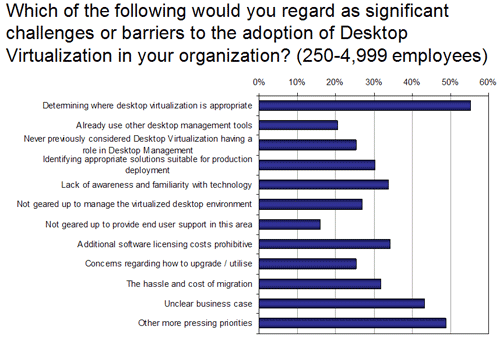
Nevertheless, among those who responded, when it comes to challenges or barriers to the adoption of desktop virtualization, the small matter of "determining where desktop virtualization is appropriate" was ranked as the biggest issue, closely followed by "unclear business case" and "other more pressing priorities". A self confessed "lack of familiarity with the technology" highlighted that all parties had major work to undertake before starting major desktop virtualization projects.

Wind the clock forward, and it would be interesting to know if things have moved on at all over the past 18 months. Today's more prevalent desktop virtualization approaches (in which the virtual desktops themselves are run on servers, with their display's served up to desktop clients) are often considered under the banner of Virtual Desktop Infrastructure (VDI). If you have any thoughts on such approaches, particularly if you have started to investigate, pilot or roll out VDI solutions, we'd love to hear some of your experiences in the comment section below.

In terms of practicalities, our own view is that the rational place to start is to consider just what desktop systems are currently deployed and what desktop services are being used by whom. At heart this amounts to having an up to date desktop asset repository which can be used as a foundation for objective analysis. After getting such information and working out what solutions fit where, it is worthwhile remembering that any desktop virtualization implementation does not have to be an "all or nothing" undertaking. Instead, mixing the many offerings available may be the most appropriate fit to a range of business needs.

If you have any thoughts on this, again we would like to hear from you, e.g. your experiences with regard to use segmentation, targeting of deployments, and so on.

Looking at a specific set of use cases, one of the areas that some VDI solution suppliers have been keen to promote, is the provision of access to corporate systems from private PCs. Similarly, some feel that providing contractors and other outside parties access to select corporate systems would be another hot area for VDI deployment. In the US a number of organisations have begun to experiment with variations on this theme: instead of supplying users with corporate PCs they provide them with an allowance with which they can purchase a machine of their choice. This machine then has a desktop virtualization system laid upon it and corporate access is delivered in an isolated virtual machine on the desktop thus in theory completely separating corporate and personal use.

We have yet to see if this takes off outside North America, and any opinions from readers in Europe or other parts of the world would be interesting to hear on this topic.

If there are other aspects of desktop virtualization you would like to comment on, please go ahead. Are you, for example, happy that you have a good idea of what is available from the traditional Thin Client / Terminal Services / Citrix type offering through to the newer virtual desktop and application streaming options? Have any tips or workarounds for some of the challenges that came out of our research? Are skills and experience available, either internally or from outside the business? How easy are they to come by and keep?

Please feel free to join the debate by adding your comments below.

Cloud storage: Lower cost and increase uptime

Latest Comments

Same problem, different tech

"In the US a number of organisations have begun to experiment with variations on this theme: instead of supplying users with corporate PCs they provide them with an allowance with which they can purchase a machine of their choice."

This sounds like an awful idea. Who get to support all of those PC that the random idiots buy?

0
0

Two words

VMware ThinApp.

0
0

Used, implemented, supported desktop virtualization for decades

Desktop Virtualization has been a rewarding topic for decades in Managed Services Device Management environments.

Desktop users often need to access equipment on customer sites for management in a secure way where activity is logged and where desktop users can not have direct routable access to the customer environment.

The first phase was to deploy a couple of highly secured systems, offering virtual desktops, and using X11 protocol to provide the desktops back to the user PC's, desktop workstations, or X Terminals. Since the highly secured system could be VERY controlled, microsoft worm/virus proof, highly logged, and very auditable, it was a success in allowing the business to be conducted. We saw this model replicated to dozens of operation centers world-wide during a process referred to as "regionalization". Hummingbird Exceed was a very reliable high performer. The need for the occasional remote user would use Hummingbird Exceed on Demand. Both products were exceptional, in comparison to the competition.

The second phase was to centralize the systems into a highly redundant and clusterized central data center, in order to save costs, provide better redundancy, and consolidate budgets to fund additional software. With people located around the world trying to get access to tools in a single data center - the challenge was significant. The original Hummingbird Exceed licenses would not be leveragable, since the WAN provided too much latency. The client-server version of the tool (to replace X11) performed like a slug in comparison to the snappy local X clients running on the same server as the management platforms. The newer versions of the Hummingbird Exceed on Demand thin clients were the snappiest virtual desktop cliients we tested but did not provide refreshes correctly of some newer software (tech support could not resolve it at the time.) A combination of Windows Terminal Server and Hummingbird Exceed on Demand could be used, but it was WAY TO EXPENSIVE of a solution to deploy. In the end, a deployment of VNC consoles for operation centers for domestic users and GoGlobal consoles for International users proved to be an excellent solution, although the VNC consoles are a little slow and force users to use a framed virtual desktop window while the GoGlobal offers a nicer user experience where the framed virtual desktop window is optional and virtualized desktop clients run snappy all around the world. We support 200 remote and virtual users.

When client software needs to be upgraded, it is very easy to go on the central servers, redirect icons/shortcuts from old software to newer released software, without having to disrupt the user community with downloading software. One software installation has to be done for hundreds of users instead of debugging hundreds of software installs. Correcting a problem revealed by a single help desk ticket instantly propagates to all desktops.

The Sun Secure Global Desktop solution is beautiful, but the investment in the current infrastructure is such that it is done and people just take the existing virtual infrastructure for granted. The phrase "virtual desktop" does not really even get considered - it exists, always worked, always been reliable in production, meets the business needs, and makes software maintenence a very nice thing.

0
0

More from The Register

SCO vs. IBM battle resumes over ownership of Unix
Zombie lawsuit back and wants to suck the brains out of Linux
Bjarne Again: Hallelujah for C++
Plus: Now officially OK to admit you never used STL algorithms
Interwebs taunt Sir Jony over Apple eye candy makeover
Hey Ive, Ive... add more unicorns, willya?
Apple: iOS7 dayglo Barbie makeover is UNFINISHED - report
Plus: You don't like the icons? Blame marketing
Red Hat to ditch MySQL for MariaDB in RHEL 7
So long, Oracle! Don't let the door hit you on the way out
Shy? Socially inadequate? Fiddling with your phone could help
App 'tells the brutal truth' about social inadequates' chatup lines
Java EE 7 melds HTML5 with enterprise apps
New release arrives with GlassFish, NetBeans support
 breaking news
'Office Facebook' firm Tibbr wants you to PAY for mobe-meetings app
Great idea. Punters won't cough for it though
 breaking news
The only Waze is Google: Ad giant tipped to gobble map app 'for $1.3bn'
Pac-Man-satnav-ish upstart in bidding war with Apple, Facebook
 breaking news
PM Cameron calls for modern, programmable computers! (We think)
IT education musings to G8 chiefs to mystify IT industry