


This article is more than 1 year old
Digital Vision GiGo DV-DTR1 USB PVR
Heir apparent: granny's new VHS?

Review "Today's digital VCR replacement" is how the UK manufacturer Digital Vision describes its new GiGo Freeview set-top box. Designed to sell for less than £70, the device is a granny-friendly PVR with an unusual feature that will appeal to geeks (at least to this one). Unlike the majority of PVRs on the UK market, the GiGo records TV in a way that makes the data readily transferrable to your PC for editing and re-encoding.
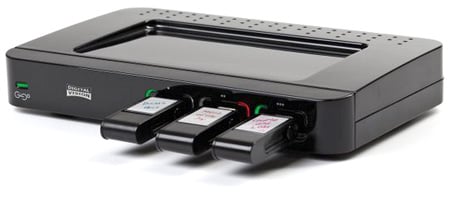
Digital Vision's GiGo DV-DTR1 USB PVR
This is because it's a PVR without a hard disk drive. Instead, it's equipped with three USB ports, so that programmes can be directly recorded to USB flash drives. Alas, drives aren’t supplied but, as the GiGo records MPEG-2 files, a typical movie takes up 2-3GB, so a minimum 4GB drive is recommended.
You'll also need the flash to be the high-speed transfer type, and formatted as FAT32. Flash memory discounts down to around a quid per GB these days, but the media is still significantly more expensive than VCR tapes. However, the quality and reliability is orders of magnitude better, and of course USB flash drives are a lot more manageable.
The ideal Freeview STB would include a large hard drive and an Ethernet connection that made the drive and its contents network accessible. The poorly-received Archos TV+ would have fitted the bill had Archos remembered to include a Freeview tuner. The Humax Foxsat-HDR comes with a (currently unused) Ethernet connector, but also has a working USB socket that can be used to transfer data off the hard drive. But it's a satellite receiver, not a Freeview device, and at nearly £300 costs more than four times the price of the GiGo.
As a Freeview STB, our re-release review model unfortunately lacks the refinement of Freeview+ but Digital Vision reports that this will be featured when it hits the shops. There's only a single tuner, so you can't record to one Freeview channel while viewing another. However, you can still watch a pre-recorded programme while recording a second programme.

Bare essentials: no HDMI nor separate digital audio interfacing
Rear connections are minimal and you'll search in vain for HDMI and digital audio. But there are two SCART sockets: one for attaching a legacy VHS machine, the other for output to the TV. The TV SCART socket offers RGB, composite or S-Video output. The VHS socket gives newcomers to digital an option to continue recording onto their old VHS machine. Unfortunately it can't be used to digitise legacy VHS tapes across to a USB flash drive.
 Biting the hand that feeds IT

