The Register® — Biting the hand that feeds IT

Feeds
70%
Brother P-Touch 2100

Brother P-Touch 2100 label printer

Sign of the times

  • print
  • alert

Review While paper dominates most printing issues, there are those who need a different kind of beast to print on plastic to produce long-lasting identification and warning labels. The old embossed Dymo tape of yore, adorning dad’s tool drawers and just about every fuse box in the land, while still going today, has had to give way to more intricate labels with stylish fonts. A case in point is Brother’s P-Touch 2100, a self-contained label printer, which can produce a wide variety of print effects on cut-to-length PET tape.
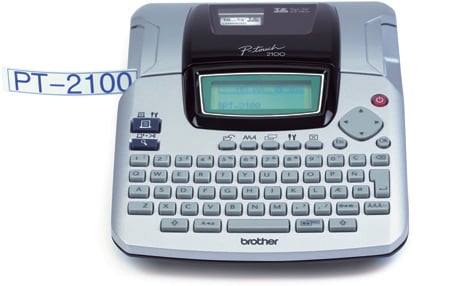
Brother P-Touch 2100

Brother's P-Touch 2100 label printer

If you’re used to a printer being a big, heavy thing that sits in one place on a desk, churning out pages of black text and colour graphics, the P-Touch 2100 will come as a bit of surprise. Yes, it is intended for a very different kind of printing, but it also ably demonstrates what can be done to make a light, compact, self-contained printer, which can go where the work’s needed.

The P-Touch 2100 is about the size of a printing desktop calculator, the kind with a hard copy print roll. It has a nearly full Qwerty keyboard set into its sloping front surface, with ‘dead flesh’ rubber keys, which are still quite adequate for the small amounts of text likely to be typed on them.

Most characters are included in the Qwerty set, but there’s a distinct lack of punctuation. The missing symbols, which include straightforward things like exclamation marks and brackets, can be called up using the symbols menu and scrolling through until you find them. This is fine for more esoteric symbols, but it would be easier to have a second function key to get at the day-to-day ones.

The bitmapped 128 x 48 green LCD screen normally shows three lines of characters and displays what you type, but when accessing special functions, like font selection or label properties, it can show other combinations and sizes of character. It also displays the clip-art and symbols available in the printer’s memory.
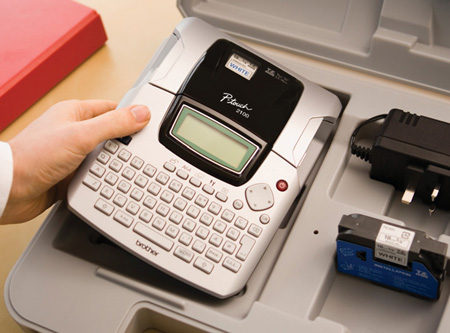
Brother P-Touch 2100

Label of love: complete with packing case for the serious signwriter

Two sockets on the right-hand side take power from the 9V power supply, included with the machine, and a USB connection to a PC. Underneath is a battery compartment, taking six AA cells, so the machine can be used completely free of the mains. To emphasise the portability of the printer, it comes complete with an electric drill-style plastic carrying case, so you can grab your P-Touch 2100 at short notice and dash to where labels are desperately needed.

Latest Comments

Hasn't ANYONE read their manual, or just tried fiddling with the settings ?

The Brother label printers I've used have a setting to control the tape usage. If printing several labels, just turn down the tape setting and it shoves out less blank tape - you then need to cut the labels apart with scissors. The default setting adds blank tape to shift the printed label clear of the cutter PLUS sufficient extra blank tape to make the resulting labels symmetrical.

I've used different versions of these printers for years - wouldn't be without them.

PS - the labels are actually laminated - there is nothing high tech about this. Pull an old cartridge apart and you'll find that it contains three rolls of material. First there is the base - the background colour with adhesive and peel off backing paper. Then there is a roll of ordinary thermal transfer 'ink' in whatever colour the text is printed. Lastly there is a clear layer (with it's own adhesive back) which is laminated onto the front of the background after printing. The result is (as others have said) a very durable label.

Now if only they did Mac software for these.

0
0

Reducing wastage of label tape

If you know that you need to print several labels then the you can reduce the amount of tape wastage by printing one (long) label that contains all the text you want, separated by a few space characters, and then use a scissors to cut out the individual labels. For example, when labelling plugs, print one label that says "TV radio kettle toaster hi-fi DVD".

0
0

Tape wastage

The reason I made the wastage comment is that the Dymo LabelWriter Duo, for example, doesn't waste tape in the same way. OK, it's a label printer, rather than a standalone label-maker, but it uses very similar technology. All it really needs to avoid the wastage is some way to wind the tape back, so the print head lines up with start of each label -- not too hard to achieve, I wouldn't have thought. I reckon 12% wastage on an average length of label is quite high.

Steve, I'll give you exclamation mark, but it still can't do (, ), ", _, +, = or @ from the keyboard, only by selection from a menu. Some symbols are more essential than others for labels, or course.

0
0

Very Useful tool...

I've used various iterations of the P-Touch and M-touch label machines for a number of years. They are ideal for just about any task that requires a label- I used mine primarily for labeling network and telcomm connections, printers, and servers. While the PC interface is a handy feature to have, it's only really useful for batch operations and a bit of mucking about with their software.

0
0

@Steve Foster

Agreed - I have a Dymo LabelPoint 150 for Network, system and labelling the tea and coffee jugs - and it does what it says on the tin - prints labels from the nice and small to the stupidly large to indicate a switch is dead and don't use it.

It's defiantly a tool an engineer should have if they're trying to document things and work out where they should go.

My soultion to the wastage (apart from printing smaller labels) is to use a pair of scissors to do trimming with - part of the issue is the amount of feed is required.

But unless you're printing every 5 minutes, tapes last for a fair old time in my experience

0
0

More from The Register

US boffin builds 32-way Raspberry Pi cluster
Beowulf cluster built for the price of a single PC
MYSTERY Nokia Lumia with gazillion-pixel camera 'spotted'
With 20Mp sensor - NOW will you try Windows Phone 8?
 breaking news
Review: HP Pavilion 14 Chromebook
All roads lead to Chrome?
Dell's PC-on-a-stick landing in July: report
Wyse up, suckers, could this be a new set-side-stick?
Borked your iDevice? Pay EVEN MORE to have it fixed by Applecare
Or scream at their hapless techies on their forums
Euro PC shipments plummet into bottomless pit of DOOOOM
11th quarter of decline, 20pc drop on last year - Gartner
Nintendo throws flaming legal barrel at YouTubing fans
All your walk-through vid revenue are belong to us
Report: AT&T dropping Facebook phone after dismal sales
Turns out folks won't buy that for a dollar