


This article is more than 1 year old
Garmin Nüvi 1340T
Slimline satnav that's also thin on features

Review As part of Garmin's recently refreshed in-car satnav range, the Nüvi 1340T will be the one satnav you won't want to leave stuck to your dashboard. With an easily portable slimline design, the Nüvi 1340T features a pedestrian mode that includes the ability to hold your hand on London's underground network.
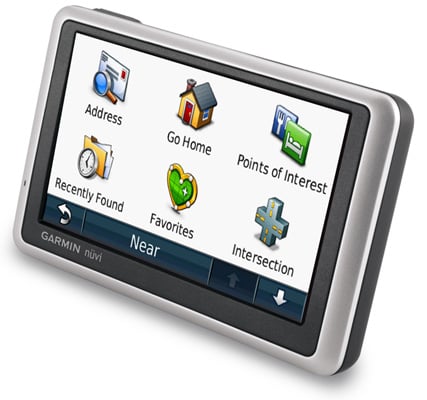
Slimline navigator: Garmin's Nüvi 1340T
The 4.3in widescreen display has a resolution of 480 x 272, while the chassis weighs 160g and measures 12.2cm wide, 7.5cm tall and just 1.6cm thick. There's only one physical button on the device, namely the power button. A micro SD card slot sits on the left side, but with a whopping 4GB of internal storage – and only just over half used – it's unlikely you'll need to use it. Look carefully and you'll notice a mic on the left side, however with no Bluetooth or voice recognition functionality it's a totally redundant feature on the 1340T.
Start up times are quick, with the main menu appearing after just 20 seconds from cold and the satellite lock being obtained a few seconds later. Browsing the map, however, can be painfully slow - on occasion, we had to wait a good 10 seconds when scrolling around before the screen updated. We also experienced a couple of crashes – software-based, not multi-car pile ups – when browsing with the GPS receiver switched off. Thankfully, neither of these problems occurred during navigation.
The 1340T comes with street level road maps for Western Europe, courtesy of Navteq. Register your device with Garmin and, if a new map is released within 60-days of your first journey, you'll be able to download it for free. From then on, single map updates cost £73 or lifetime updates can be purchased for a one-off £100 payment.
If you enjoy having road names read out, the Nüvi 1340T will gladly oblige. Naturally, some road names are too complex for the text-to-speech engine to pronounce accurately, but it makes a decent fist of it and reads out roads such as the A259 in the correct "A-two-five-nine" manner as opposed to "A-two-hundred-and-fifty-nine".
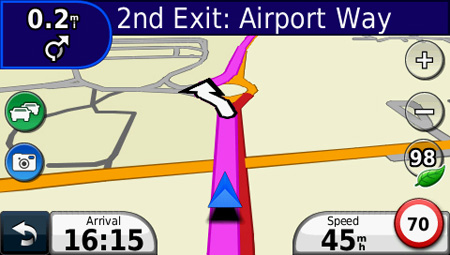
Navigation is good, but the 'next turn' icon could be bigger
Navigation commands are clear, but we did find the 'next turn' icon that appears in the top right of the screen a little small – especially when approaching roundabouts. It's able to belt out instructions loud enough to be heard over the roar of motorway driving, although it won't increase the volume automatically as you speed up. You also have to return to the main menu, in order to change the volume – as with so many other sat navs, simple physical volume buttons would be so much better.
 Biting the hand that feeds IT

