


This article is more than 1 year old
Dell Studio 15
Designer chic without price or performance penalties

Review Dell is going big on personalisation with the Studio 15, with five colours and 11 artistic designs available to choose from. If you really want your laptop to stand out from the crowd, then you could opt for one of the colourful finishes from designers such as Mike Ming, Derek Welch, Joseph Amedokpo, Siobhan Gunning or Bruce Mau. This comes at a cost, however, with three colours (lime green, purple and red) adding £29 to the bill and artistic designs an extra £69.
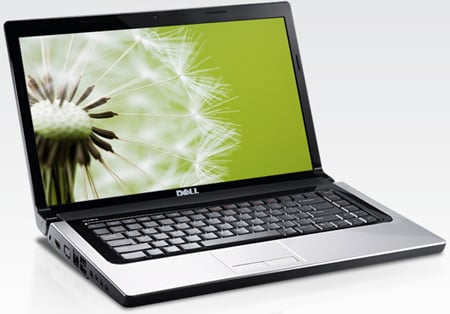
Dell's Studio 15
There's also a bewildering array of components to choose from, but this offers the freedom to tweak the spec to suit your needs. The review model came with a 2.4GHz Intel Core 2 Duo P8600 processor, 4GB 800MHz DDR2 Ram, 320GB 7,200 rpm SATA hard drive, 512MB ATI Mobility Radeon HD 4570 graphics, an internal DVD writer and a six cell battery, all coming in at £719. Adding £100 will get you the Blu-ray reader but if you want to burn Blu-ray discs as well, then £280 will get you the writer.
Going the other way, opt for a 2GHz Pentium Dual Core T4200 CPU, integrated Intel GMA 4500MHD GPU and trim the memory down to 2GB together with a 160GB hard drive, and you'll shave around £250 off the price tag. Designer options aside, the Studio 15’s wedge shape starts out at 30mm high at the front, rising to 43mm at the rear and it measures 372mm wide by 252mm deep. Tipping the scales at 2.65kg, it’s not the most travel-friendly laptop, but manageable for short excursions.
On the whole, the Studio 15 has a good array of connectivity options. Down the left hand edge you'll find both HDMI and VGA output, Gigabit Ethernet, USB, a combo USB/eSATA port, 4-pin Firewire, microphone and two headphone sockets. Flip over to the other side and you'll see a power connector, an additional USB port, memory card reader (SD, MMC, Memory Stick), ExpressCard 34 and a slot for the internal DVD writer. If you're hunting for the power switch, you'll find that nestling in the middle of the screen hinge on the right hand side.
However, having only two dedicated USB ports seems a little stingy, if you do actually require the eSATA interface. These main USB ports are, on opposite sides, so you at least have some degree of freedom when it comes to positioning your peripherals.
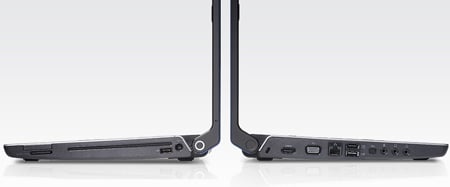
The eSATA port also doubles as third USB interface
That said, some portable USB hard drives rely on a Y connector for laptop use. These godawful break out cables featuring two USB connectors are typically short in length and can’t reach both sides of a laptop but, nevertheless, need to use two USB ports for power and data, respectively, to work on most notebooks. So if you do use eSATA and you find yourself with one of these drives you'll certainly need to do some forward planning.
 Biting the hand that feeds IT

