Office 2010 tech preview: Expect the expected
And some web apps (eventually)
Customer Success Testimonial: Recovery is Everything
Review Microsoft has released a technical preview of Office 2010. This is a pre-beta release intended for feedback, as well as promotion, so it's not feature-complete and may change before the final release planned for the first half of 2010.
Nevertheless, it offers a fair guide to what Microsoft is planning for its ubiquitous office suite. The short summary is 'more of the same': more of the controversial Office Ribbon UI, more features for products that arguably have too many already, and more integration with SharePoint so that users are drawn deeper into Microsoft's platform.
At the same time, the company is looking perhaps nervously at web-based Office suites from Google, Zoho, Adobe, and others and responding with Office web applications of its own, while carefully avoiding any suggestion that they might replace the desk-bound versions.
"I wouldn't give up the full capabilities of my Office applications on my PC," says Office product manager Monica Mendoza. "But isn't it great to know that you can access your Office files from anywhere, directly in a browser?" Considering the importance of Office to its bottom line, you would not expect Microsoft so say anything else, but it is a complex message to articulate.
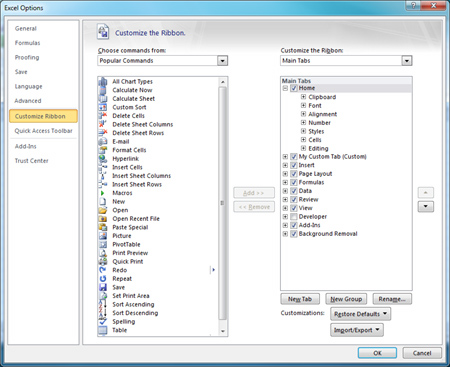
Customize the Office Ribbon, as you could with the pre-2007 toolbars
The big themes of Office 2007 were new XML-based document formats, which sparked a ferocious standards war, and the disappearance of menus in favour of a fat-tabbed toolbar called the Ribbon. Web apps aside, there is nothing so radical here. Office 2010 feels more like a refinement of the earlier version. The Ribbon is now extended to Outlook and Publisher. One crumb of comfort for Ribbon-haters: a "customise the Ribbon" option has appeared, letting you add and remove tabs, groups, and individual commands.
As for Open XML, it's notable that Microsoft neglects to mention it at all in its Reviewer's Guide, even though this is supposedly the release that will fully implement ISO/IEC 29500. It is odd how this has gone from a cause to campaign for, to not-worth-mentioning in just over a year. To be fair, few users ever cared about XML formats themselves: it is only when documents get scrambled or fail to open that such things become important.
So what is new here? 64-bit versions for a start. They're now an option throughout. The most obvious use is gigabyte-size Excel spreadsheets, though working with any large document should now be easier. Excel also gets a new single-cell chart type called a Sparkline and a new Slicer tool for filtering data. Some features turn up throughout the product.
The Office Button - really a file menu, and one which some new users find hard to discover in Office 2007 - has been replaced by a Backstage view, combining file, preview, and document options into one full-window dialog. It sounds odd, but it works well. Paste Preview is another new feature, showing an instant preview of Paste actions.
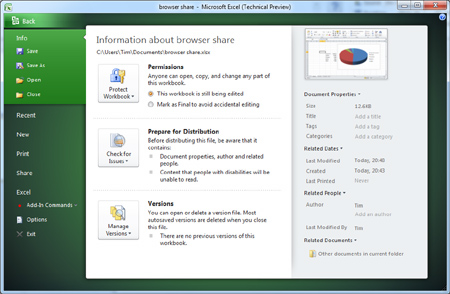
Backstage View replaces the Office button to combine the File menu and previews
Ideal for product reviewers, a screenshot button lets you insert an image of any open window into the current document. Several Office applications now support simultaneous multi-user editing, provided the document is hosted on SharePoint or Windows Live.
Next page: Video inserts
COMMENTS
About the ribbon
I said it many times before, and after using Office 2007 without issues for more than 6 months now, I reaffirm myself even more; The ribbon is a huge step back it turns a GUI application into a VCR Like appliance where you have to remember what button does what.
It may be OK for dad or grandpa but not for those who know how to use a computer already. It makes hard to find functionality on the software.
The only reason for being able to use Office 2007 with the ribbon I could find is that I knew Office quite well already.
What proves the ribbon a failure is the fact that not many are implementing it, except for MS's whore partners like Autodesk (I still remember when autodesk made things like IE 6 and the .NET framework a requirement for Autocad...)
Don't want 2010
I'm no five-minute user: I've been using MSOffice and its predecessors for donkey's years. I use them in my work and hobbies and train people too. I'm perfectly happy to move with the times and am not distressed when someone moves my cheese.
MSO XP had a brilliant task pane that was a one-stop shop for anyone starting work on something and they diluted it with MSO2003 by taking away Create that people use and adding help that no-one needs first thing, and if you used help it no longer produced the answer at first entry like MSO XP did. MSO 2007 is worse. The ribbon is fine and merely means that I've wasted years training people on how to use the task panes.
That's the nub of my problem with all this: people cannot become good at something with years of experience, because if they do then MS changes the ball game and the position of the goalposts and the game rules and the ball park its played in. All to keep up the revenue stream and to 'differentiate' itself from the other players. By the time my employers move onto a version it is already several years old and MS doesn't give a toss about my dislikes because they're working on pushing out the next wonder.
@Des
>> Are you sure you work in IT? Don't take it too personally, but spending an hour searching the ribbon to make some "simple changes" to a document seems a bit excessive.
Don't you mean 'Are you sure you should be working in IT'. I can think of plenty of people who "work in IT" that don't know one side of a keyboard from the other.
Sure anyone who is truly computer literate can figure out how to work the Ribbon. I don't mind the Ribbon, and I can see how it is better in many ways. I figured out how it worked, and how to go about finding what I needed, without great difficulty. It certainly didn't help that they decided to not only move everything but also rename most of it, so you could even easily search for stuff in the help files.
The problem with the Ribbon, is that most computers aren't "computer literate". They can't sit down at a computer and figure out how to use by trial and error, reading help files and searching the web. The need to be shown how to do something several times, then they need to write it down step by step in an exercise book and then they can be let loose, with tech. support (also generally not computer literate) a phone call away.
I don't think anyone would argue that the Ribbon isn't better for people completely new to office software and computers in general - trouble is that most people aren't new to computers. Failing to include a 'classic mode' was a fatal mistake on Microsoft's part. I would be very unwilling to inflict Office 2007 on my users, if only because I don't want to be showing them how to do simple stuff every five minutes (it's bad enough as it is). I would have put money on them including a 'classic mode' in Office 2010, I suppose there is still a chance they might - or perhaps we'll have to wait until Office 2014.
>> Except to my knowledge no-one else outside MS has bought into this 'new paradigm'... (MrT)
This 'new paradigm' isn't that dissimilar to the tabbed toolbars in Borland Delphi - ten years ago.
BTW on the subject of Office 2010, I had a few minutes of fun this morning helping a friend who installed it. For some reason Outlook 2010 decided to use port 587 (message submission port) as the default SMTP port, probably not a bad default, but I can't imagine it takes more than half a dozen lines of code in the wizard to test for port 587 and use port 25 if it doesn't get a response. Still I suppose it is pre-release.
One last thing, whilst I am thinking about it - what would people's views be on a Ribbon version of The Gimp - surely no one could complain about that? They could even base the layout loosely around the Windows 7 version of Paint.

IT infrastructure monitoring strategies
Requirements Checklist for Choosing a Cloud Backup and Recovery Service Provider
Data control in the cloud
Cloud based data management
Enabling efficient data center monitoring