


This article is more than 1 year old
Things 1.3.8
Task organiser that's more about tasks than organisation

iPhone App Review Task manager apps all pose the question: 'How organised are you?' They imply that you're not very organised at all, or you wouldn't be considering software to help you get on top of things.
But there's another question to consider: "How organised do you really need to be?" There's a world of difference between feeling the need to record tasks so that you don't forget to do them, and anally itemising and indexing every aspect of your existence.
So few task managers take that second question on board, many of them make you end up spending more time managing to-do lists than performing the tasks themselves.
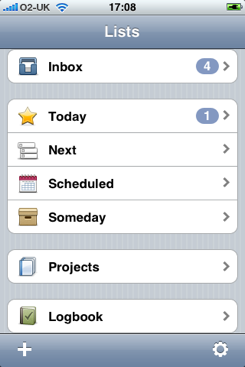
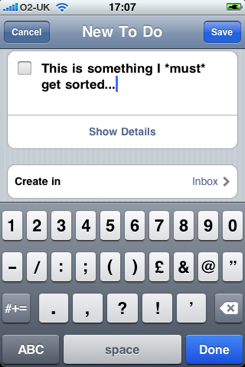
Cultured Code's Things:
Things isn't entirely free from criticism in this respect. Like others of its ilk, it do make task management less fluid than it ought to be. But while it provides all the tagging, timing and filing features for lovers of the displacement activity, it can be used in a more casual fashion by the rest of us.
Things' Inbox is where you enter and list to-dos, and arguably you don't need to dig any deeper into the app. Write 'em down then tick 'em off when they're done. Easy.
Not sufficiently methodical for you? Then Things will let you tag your to-dos with relevant labels - Work, Home and Errands are there already, but you can add more - jot down additional information, and mark the date the task has to be completed by, if it does.
You can also timestamp tasks with a start date. We like the notion that a task can be ignored until some point before it becomes due. You have a job that needs to be completed by the end of August. But as it's only the beginning of July, you can tell Things not to bother you about it until the end of the month.
Things' Projects system is similarly useful, providing a way to group related to-dos.
The app also presents lists of tasks due today, tasks due for completion shortly and tasks that are entirely out in the wide blue yonder. To-dos can be easily moved from one list to another, and made more or less urgent. Throughout, the app makes very good use of the iPhone UI.
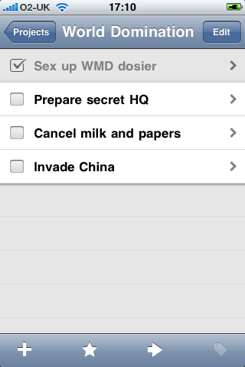
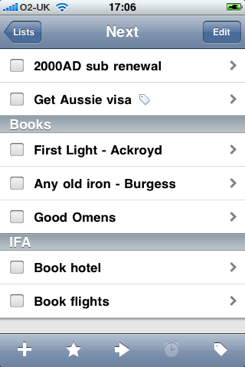
Grouping items into 'Projects' (left) is good, but why have two, separate upcoming items lists?
But then it complicates matters. There's no connection between the Inbox and Next, where all tasks but those that need to be completed today are listed. All, that is, but those in the Inbox. Things' developers assume you are or will become organised enough - remember, this is what task managers are really about - to classify all of the Inbox entries into one of those other lists.
We suspect many folk don't work that way, and Things shouldn't force us to. Yes, you can organise to-dos when you create them, but what if you don't want to organise them? Tush, little one, Things knows best. You will organise your to-dos, or Things will not warn you about them on its iPhone icon.
Should you really have to look in more than one place to be sure of noting all the tasks you have coming up? If it really wanted to be simple, Things would automatically place new to-dos in Next, ready to be appended, scheduled, filed - or simple left to be actioned as and when.
Verdict
Things isn't quite as "effortless" as its developer believes, but it's nonetheless one of the least intrusive task managers we've seen. It can't quite help trying to justify its existence by imposing an organisation workflow on you, but at least it's a simple one. If you find the back of an envelope or the iPhone's Notes app aren't sufficient for keeping track of to-dos, you'll find that Things certainly is. ®
 We'll be regularly reviewing iPhone apps - and, in due course, Android downloads - alongside all our ongoing hardware review coverage. Got a favourite app you'd like us to cover? Let us know with a comment...
 Biting the hand that feeds IT

