The Register® — Biting the hand that feeds IT

Feeds
70%
Buffalo LinkStation Quad

Buffalo Linkstation Quad

Nas simplicity and versatility, but at a price

  • print
  • alert

Review While most low-price NAS products tend to target domestic use separately from serious small office installations, the Buffalo Linkstation Quad attempts to straddle both these markets, albeit, with a price hike. Yet it offers home users a faster, beefier file store and media server, together with RAID redundancy, Internet-wide data access and high-capacity backup to satisfy office environments.
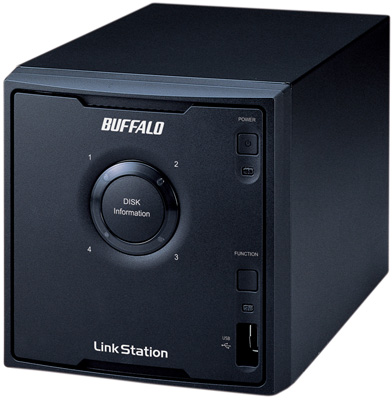
Buffalo LinkStation Quad

Buffalo's Linkstation Quad: appears imposing, but is small and unobtrusive

The device is a gigabit Ethernet NAS server – supporting 10, 100 and 1000BaseTX network connections ¬– and contains a stack of four SATA hard disk drives, all encased in a compact and tough black box sized 150x150x230mm. A quieter-than-expected fan keeps the drives cool.

The Linkstation Quad has two USB 2.0 ports: one at the front and the other at the rear. You can attach a high-capacity USB external drive to either and back up your Linkstation Quad data to it. Alternatively, you can attach any external storage device, such as a portable disk drive, a USB flash memory or a digital camera, and back up all its media files to the Linkstation Quad in one step by pressing the 'Function' button on the front. You can even attach a standard USB printer – although not a multifunctional printer – and share it between Windows clients, using the Linkstation Quad to manage the network print queue.

A 'Power Mode' switch at the back presents two settings: 'Auto' and 'Manual'. With this switch flicked to 'Auto', the Linkstation Quad runs in wake-on-LAN mode, allowing any computer on the network to power up the device remotely. The 'Auto' setting also enables the device to power itself down if it senses no network activity after a set period, and you can set up a schedule for powering the system up and down automatically.

As delivered, the Linkstation Quad is configured to operate the four disk drives in RAID 0. In our test system, that meant four 250GB drives operating as a single 1TB volume. Naturally, this offers no redundancy protection and makes the product uncomfortably expensive: you can buy single-disk 1TB NAS systems for £100 less than this. You would be better off reconfiguring the device as RAID 1 or 10, or RAID 5 (parity) in order to take advantage of the multi-disk arrangement, although this, of course, reduces the effective data storage in a 1TB unit to 500GB or roughly 750GB, respectively.
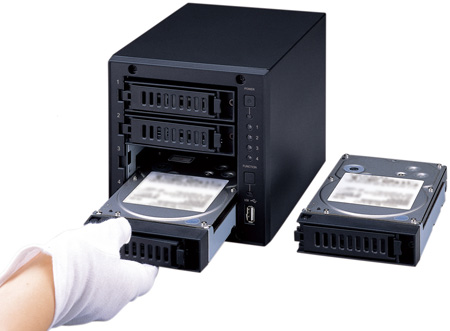
Buffalo LinkStation Quad

Drives are easy to remove and replace, but are not hot-swappable

Thankfully, the Linkstation Quad makes it very easy to remove and replace the disk drives individually. Unclipping the front fascia reveals four independent drive bays, and you can simply unclip and slide each drive out in its own as required. Note, however, that the drives are not hot-swappable in any RAID configuration.

Latest Comments

@Fingers

I have 10 Terastations in service all around the country, and have replaced drives in them before. They are an old model however. I think on the models I have the os is held on cmos. The new discs are seen as 148 GB drives regardless of the size.

0
0

Playing catchup?

Reading that, it sounds like they've brought out a competitor to the Netgear ReadyNAS NV+ range, just too expensively and missing half the useful features of the latter.

Did look at them for our office, but real big panic point was getting the drives from them exclusively. If using RAID5 at least the drives should continue, but having to source the drive from them isn't good especially if you're using this as the office fileserver which is where it's best suited.

Re. raid expansion - from everything I read you'd have to buy 4 new disks from them, then clear it all and recreate the RAID array. Which isn't good compared to the X-RAID system on the ReadyNAS where you can expand it just by adding a new disk and it just gets on with it.

No hot swappable drives? OK, not a major issue generally, but again fails compared to the competition.

Well priced, erm, not too sure about that. Only serious home theatre users and offices are likely to be buying something this expensive, and it fails to meet a lot of their needs.

Mind you, they do a nifty little linkstation 1TB drive which is seriously tiny, no fan etc. and very portable for backups.

0
0

No RAID6 ?

I think the Synology DS409Slim is much better for the money, but whatever floats yer boat ;-p

0
0

Raid Expansion

Is it possible to expand the RAID, when bigger capacity disks become available?

0
0

@Annihilator

If it is anything like the Terastation & Terastation Pro products, the O/S is striped across all drives in the array. This means that you can't buy one without drives and you can only buy replacement drives from Buffalo in the event of a failure or upgrade.

Of course, there are means of getting around this but it is a bit of a pain having to do so.

If you want to source your own disks, you are better off with another NAS manufacturer. Cheaper too.

0
0

More from The Register

Microsoft reveals Xbox One, the console that can read your heartbeat
Upgrades Live service – and no always-on requirement
 breaking news
Review: Sony Xperia SP
The new mid-range marvel? Oh yes.
US boffin builds 32-way Raspberry Pi cluster
Beowulf cluster built for the price of a single PC
Dell's PC-on-a-stick landing in July: report
Wyse up, suckers, could this be a new set-side-stick?
Review: HP Pavilion 14 Chromebook
All roads lead to Chrome?
Borked your iDevice? Pay EVEN MORE to have it fixed by Applecare
Or scream at their hapless techies on their forums
HTC woes prompts 'leave now' tweet from former staffer
Chief product officer latest to bail from sinking mobe-maker
Euro PC shipments plummet into bottomless pit of DOOOOM
11th quarter of decline, 20pc drop on last year - Gartner