


This article is more than 1 year old
Asus Republic of Gamers OC Station control box
Bios tinkering made simple and sweet?

Review The Republic of Gamers OC Station is an intriguing motherboard accessory that works as a control centre for your mobo without any of that nasty Bios business. It also handles overclocking duties. That’s what the OC stands for, see?
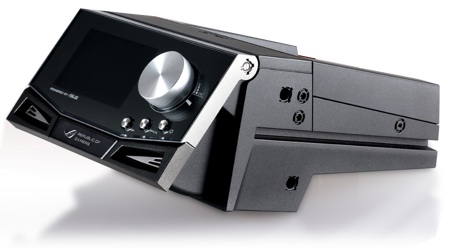
Asus' Republic of Gamers OC Station: inspired by Polaroid - or a car radio?
The OC Station fits into a pair of external 5.25in inch drive bays and connects by cable to a compatible RoG motherboard. That’s Rampage II (Core i7 on X58), Maximus II (Core 2 on P45) and Crosshair III (Phenom on AMD 790FX) so you need to think of the OC Station as part of your new PC build rather than as an upgrade for your existing PC. The data cable connects to one of the on-board USB headers and also to a special connector that has been added to the new Republic of Gamer boards.
Plug a four-pin Molex cable in the back of the OC Station to provide power, run the USB driver and you’re ready for action.
From a cosmetic stance, the OC Station looks very smart, with three control buttons (OK, Back and Power) arranged under a large aluminium control wheel. When the screen is off, the front panel is dark. Then, when you press the Power button, the 3in mono screen bursts into life. It's bright and clear, with a decent resolution. It can display six options on the main menu that cover Voltage, Frequency, Fan Speed, Temperature, Performance and Setting.
Asus has worked around the obvious problem that many tower cases sit at floor level which would make the screen difficult to read. Press the panel and it swings up through an arc of 30°, sufficient for you to find a good viewing angle.
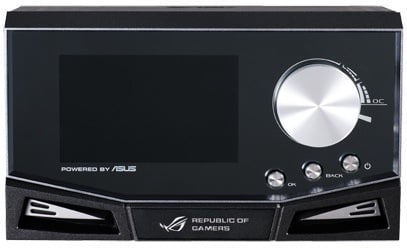
Dial up your Bios settings
Select Voltage or Frequency and you are effectively in the Bios, where you can select and change settings with a spin (or three) of the knob. Scroll down to RAM Voltage, for example, hit Select to choose it, turn the voltage up or down, press the OK button and the change is made. Windows gets confused by dynamic changes to CPU speed and continues to report the old speed, but the CPU-Z utility confirms that the changes we made took effect immediately.
 Biting the hand that feeds IT

