


This article is more than 1 year old
Canon Pixma Pro9000 Mark II
Swift and accurate A3 inkjet

Review Medium format colour inkjet printers, which sit between standard A4 and wide format production machines, fill a fairly specialised niche. Capable of printing full-bleed A3+ pages, Canon’s Pixma Pro9000 Mark II is aimed at photo enthusiasts or semi-professional photographers. Semi-pros might prefer to use it for proofing than end product, but it would also be suitable for print-on-demand applications, like sending wedding guests away with photos on the day of the big event.
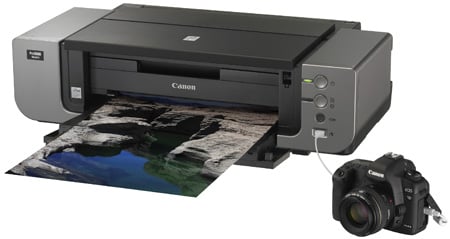
The big picture: Canon's Pixma Pro9000 Mark II
Besides the price, the key difference between a workhorse A4 inkjet – such as the Pixma MX330 we reviewed recently – and this machine, is the width of the carriage. Handling paper up to 13-inches wide, the Pixma Pro9000 MkII measures 660mm across. See how it dwarfs the adjacent DSLR in the picture. Indeed, this printer will need its own desk.
To use all its features, it’s not just the width you need to worry about. In normal running, paper feeds from a near-vertical tray at the rear to a telescopic output tray at the front, but it can also be configured to take thick or other special media from the front and print it out the back. To accommodate this, a flap at the rear is folded down and two spring-loaded butterfly supports are extended. Printing this way needs space of at least the length of the paper it’s printing at both front and rear.
The printer has borrowed a feature from several of Canon’s A4 machines, in providing direct CD print, via a separate carrier, which slides in at the front of the machine. The machine can print standard CDs and the smaller, credit card-sized ones too. CD print is useful for full-colour, on-disc printing, but also for labelling the hundreds of discs of large, high-res images photographers tend to stockpile.
It’s a peculiar truth that, as inkjet printers go upmarket, they’re provided with fewer bells and whistles. There’s no LCD panel on this machine; no colour screen to preview images and not even a mono screen to set options with. There are a couple of buttons for power and paper feed, but that’s all the manual control you get.
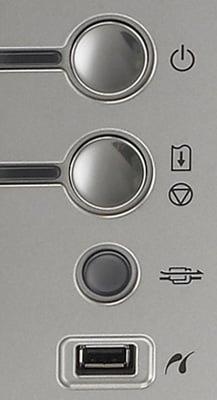
Only basic controls are accessible from the unit
Perhaps more surprisingly, there are no memory card slots, either. Presumably Canon’s argument is that a professional photographer won’t want to print straight from a memory card, without viewing and adjusting the image first on a PC or Mac screen. If that’s the case, why is there a PictBridge socket, so you can download from a camera? Most cameras have very limited PictBridge printing control and their LCD screens are inconveniently small for image proofing. Unless, of course, you’ve an LCD the size of Canon’s EOS 5D MkII that appears in publicity shots alongside this Pixma.
 Biting the hand that feeds IT

