


This article is more than 1 year old
Canon Pixma MX330
Small office all-in-one inkjet without the photo frills

Review Recent offerings suggest a handful of printer manufacturers are trying to move inkjet technology into the lower-end small office, SoHo space, by targeting those wanting the superior colour inkjets can produce, without all the glossy photo facilities of family and photo-buff models.
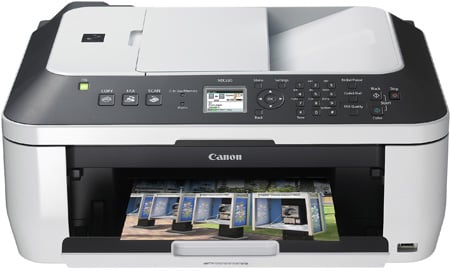
Doing the business: Canon's Pixma MX330 all-in-one inkjet
Indeed, Canon is doing its bit to differentiate between the two markets by producing the PIXMA MX range of business-oriented all-in-ones, as well as the older PIXMA MP range with extra photo facilities. The MX330 is a mid-range device, coming in at just over £100 and offering an Auto Document Feeder (ADF) and walk-up scan to USB drives, but no memory card slots or CD/DVD print.
The new design features a wraparound, black band, which surrounds the 30-sheet ADF and has the control panel built into it. The top surface is neatly flat when the machine is closed, as the ADF feed tray folds over to complete its lines. When open, it still isn’t raised lifted very high and scanned pages feed to an output tray directly beneath it.
The print feed tray is angled more steeply and mounted at the back of the machine, although there’s no separate, slide-in paper cartridge at the front to offer twin paper sources. This might have been an idea as, even without the need to load plain and photo paper, it would be useful to be able to load letterheads at the same time as follow-on sheets. Paper feeds to the fold-down front cover of the machine and, intelligently, this has an auto-release, if you fail to open it before starting a print run.
The control panel is well laid out, running the full width of the front and includes a full colour – if small, at 45mm – LCD display, designed primarily to show menu options, rather than photo thumbnails. To the left of the display are three illuminated buttons to select copy, scan and fax modes and to the right are navigation buttons, a number pad for fax dialling (no quick dials) and start and stop buttons for black and colour copies and scans.

The colour LCD shows options rather than image thumbnails, but still a surprise at this price
Click for a larger image
Lift the scanner lid and there’s a normal, A4 glass flatbed, equipped with a Contact Image Sensor (CIS) scanner, giving less depth of field than a conventional scan head. The depth of field can be important if you’re scanning material from books or magazines, where the spine ensures a page will never make complete contact with the glass.
 Biting the hand that feeds IT

