


This article is more than 1 year old
Acer DX900 dual-SIM Windows smartphone
One SIM for business, one for pleasure

Review Over the past few years, Taiwanese smartphone maker E-Ten managed to carve out a small but decent business making reasonably cheap Windows devices under its Glofiish brand. Last year, it was gobbled up by Acer to, in effect, become the giant's mobile phone division. Now we have the first fruit of the union: the dual-SIM Acer DX900.
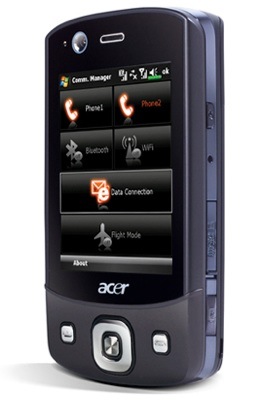
Acer's DX900: conservative looks
Aesthetically, the DX900 is unlikely to win any design awards with styling that can best be described as conservative - or dull, if you're feeling uncharitable - though it feels solid and well made. It's a little on the chunky side too, measuring 106 x 60.5 x 17mm and weighing 147g including the battery.
External switches and ports include a volume control, 2.5mm audio jack and user-definable multi-function button on the left-hand side, along with on/off and camera activation buttons, stylus bay and Micro SD slot – with a very nicely engineered cover – on the right.
At the bottom sits a mini USB port while around the back are two holes that conceal one of the loudest mobile phone speakers we have come across. Front controls are limited to conventional call answer and end buttons and a navpad with a central action key. Under the battery lurk two SIM card slots.
The ability to support two SIMs simultaneously is really what the DX900 is all about. If you can't think of a reason to have a phone with two SIMs then you can probably stop reading right about now. We can think of two reasons. Firstly, you can keep your business and private numbers separate and, secondly, if you regularly travel abroad you can use a local SIM for local calls to local people while also making calls back to Blighty without being clobbered by painful roaming charges.
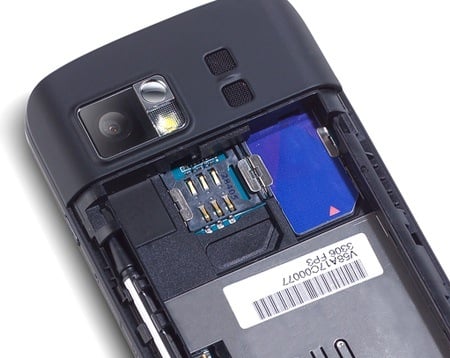
SIM bay: room with a few
Selecting which SIM to call from is simplicity itself: just type in the number then press either Talk 1 or Talk 2 on the virtual keypad. Using the call button will always result in the call being made using SIM 1. When sending an SMS message, the system simply asks which SIM card you wish to use before transmission. To make life even easier, Acer has installed an attractive bespoke Communication Manager page that lets users switch either SIM on or off at the touch of a button.
 Biting the hand that feeds IT

