The Register® — Biting the hand that feeds IT

Feeds
75%
Advent AIO-100

Advent AIO-100

When a netbook's screen is just too darn small...

  • print
  • alert

Review At first glance, you could be forgiven for mistaking the Advent AIO-100 for just a normal 18.4in monitor with what looks like a very sturdy base. However, inside that oversized foot sits a full working PC.
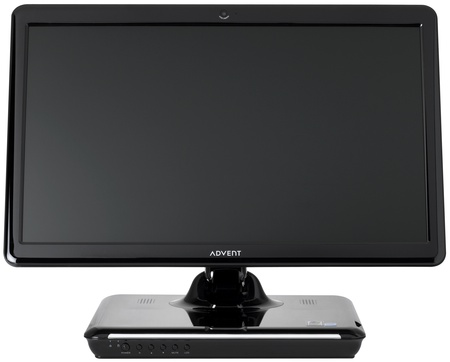
Advent AIO-100

Advent's AIO-100: netbook internals

The AIO-100 uses components you're more likely to see living inside a netbook - so you'll find the standard 1.6GHz Intel Atom N270 processor, 1GB of DDR 2 memory and a 160GB Sata hard drive.

As size and weight are secondary issues for a machine that's going to spend the bulk of its life stationary, sitting on desk, Advent has also included a DVD writer, something you'd be hard pushed to find on any of the netbook models out there.

The biggest thing that sets it apart from a netbook, however, besides the lack of battery, is the big display that sprouts from its top, fixed to an adjustable arm. There's also a keyboard and mouse thrown in, so it comes with everything you need in the box.

Running around the edges of the base, on the left-hand side you'll find the DVD writer, which is a slimline laptop model. Round the back you'll find a wired Ethernet port, power connector and three USB ports. In the far back right-hand corner, underneath a protective cover, there's a VGA connector for hooking up an additional display. Towards the front you'll find a further two USB ports, plus headphones and microphone sockets, with an SD/MMC/Memory Stick card reader sat just above.
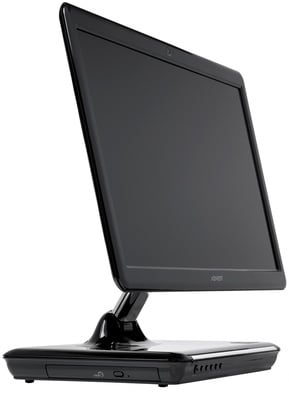
Advent AIO-100

DVD writer built-in

Along the front edge, over on the left hand side, you'll find power and hard drive LEDs, power switch, volume controls and a mute button. There's also a single button for screen brightness - each press will make it a little bit brighter until the fifth click when it will reset it to its lowest level. There's also, curiously, a button to switch off the display backlight completely. You could save some energy by turning the backlight off when you're not using the machine - it's impossible to use without it on as you can hardly seen anything - but putting it into standby is almost as quick and would save even more, surely?

Latest Comments

@W

"Imagine that. Someone with needs and wants different to yours. Try not to be so short sighted and presumptuous next time."

you sir are correct

PERSONALLY I would never buy this for myself, but I can think of a couple of people I know that this setup would be ideal for. Even with the keyboard and mouse taking 2 USB ports up seeing to them all a computer does is load Ebay and Google and nothing else.

0
0

Saisho iMac

I can't help but look at it and think of cheap, tacky, unreliable old Saisho products. Having seen one of these 'things' in the flesh, I can't understand why anyone would want it. It's been designed by the blind, for the blind

Saisho, for those who can't remember: http://en.wikipedia.org/wiki/Saisho

0
0

Re: No Thanks

This (or something similar) is a candidate for replacing the old portable tv and dvd/cd player in my lounge. Using a laptop or big box desktop as a lounge tv & dvd/cd player replacement are not such appealing concepts, compared to a compact, capable and sleek(?) all-in-one such as this.

Imagine that. Someone with needs and wants different to yours. Try not to be so short sighted and presumptuous next time.

0
0

Re: No Thanks

The advantage of this over a desktop IS the lack of cables. Lots of families have a "Dinning Room" or "Kitchen Counter" PC for the kids to use where they can be properly supervised. Something that is damn-near cable free (I'd instantly replace the keyboard and mouse with a wireless combo that would also free up a USB port - leaving just the power cable) is a fantastic boon. At the moment, we have an old (as in 6.5 years) Dell laptop doing this job but the screen is very small and even lower than this would be. And Large-screened laptops cost a lot of money.

This is basically ideal for the school homework market.

0
0

One killer feature missing....

My ideal "net-top" would be pretty much what the article describes, but with a slave USB and audio and video in ports. With a host on the USB, the machine would become a hub, serving the other five port + webcam. Then I could use the machine as any of:

A) standalone PC

B) docking station

C) terminal

I mean, think of the benefits to businesses.

You can split the office workforce into several general types of users:

1) administrators, secretaries, PAs.

Minimal IT requirements -- general office/desktop apps. Net-tops would be sufficient powerwise for them. (A)

2) specialists: eg designers, architects, engineer

Specialist processor-intensive software (eg AutoCAD) required. Perfect candidate for Citrix deployment. (C)

3) mobile workforce

Need laptops (B)

One fixed unit would provide a single hotdesk solution for all three.

'Tis the future, I tell thee.

0
0

More from The Register

MYSTERY Nokia Lumia with gazillion-pixel camera 'spotted'
With 20Mp sensor - NOW will you try Windows Phone 8?
Microsoft reveals Xbox One, the console that can read your heartbeat
Upgrades Live service – and no always-on requirement
 breaking news
The iWatch is coming! The iWatch is coming!
Reports: Apple's wrister to have 1.5-inch OLED, test units being built
US boffin builds 32-way Raspberry Pi cluster
Beowulf cluster built for the price of a single PC
Dell's PC-on-a-stick landing in July: report
Wyse up, suckers, could this be a new set-side-stick?
Review: HP Pavilion 14 Chromebook
All roads lead to Chrome?
Borked your iDevice? Pay EVEN MORE to have it fixed by Applecare
Or scream at their hapless techies on their forums
Review: Sony Xperia SP
The new mid-range marvel? Oh yes.
Euro PC shipments plummet into bottomless pit of DOOOOM
11th quarter of decline, 20pc drop on last year - Gartner