


This article is more than 1 year old
Kodak ESP 7 all-in-one inkjet printer
Photo printing doesn't get much cheaper

Review Not the best known name in all-in-one printers, Kodak now has a range of four machine. They all use the same print engine, but are differentiated by different levels of bell and whistlery. Among the claims Kodak makes for all of them is photo prints for just 7p each - cheaper than any other inkjet.
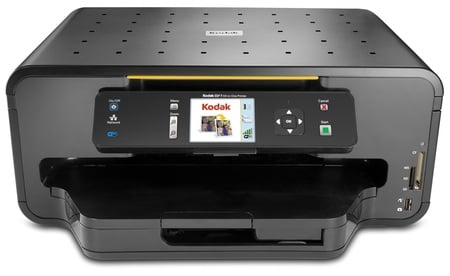
Kodak's ESP 7: promises cheap photo printing
The ESP 7 is the fourth release in Kodak’s ESP range of all-in-ones and sits below the top-of-the-range ESP9, while still offering some of its sibling's best features. It’s intended for the home, lacking as it does an automatic document feeder (ADF) and a fax facility.
Decked out in high-gloss and frosted black, the neat lines of the ESP 7 start with the curved edges to the scanner lid and finish with similar undulations in the paper tray bulge, which projects from its front. The lid has a simple pattern of small, indented squares and lifts to reveal a simple, A4 flatbed. In front of the scanner is a slightly empty looking control panel which lacks the fax number pad and touch-sensitive surface of the ESP 9.
The ESP 7 has the same size of colour display as its pricier sibling, though here it's a backlit LCD, rather than the brighter OLED. There's a square of navigation arrows, with an OK button in the centre, as well as dedicated Copy and Cancel job buttons.
Two paper trays bulge from the front of the machine, with the A4, plain paper tray holding up to 100 sheets of 80gsm paper and the separate photo tray taking up to 40 sheets of 15 x 10cm photo paper. When you request a photo print on small format paper, the photo tray slides into place automatically.
To the right of the paper trays are two memory card sockets which between them take most of the current types, including Microdrive in the CompactFlash socket. There's also a PictBridge-enabled USB socket at the bottom, for printing directly from cameras and USB Flash drives.
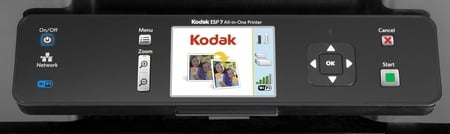
The control layout's straightforward if empty looking
The ESP 7, like all of Kodak's all-in-ones, uses two cartridges, one containing regular black ink and the other containing cyan, magenta, yellow and a "photo" black, together with a colourless overlay to protect the print. Lifting the scanner section up gives easy access to plug these two cartridges in and, apart from loading paper, this is the only physical set up the machine needs.
 Biting the hand that feeds IT

