
Lexmark E260DN networked mono laser printer
Not as fast as claimed
Agentless Backup is Not a Myth
Review Unless the vast majority of your documents need colour, you'd do well to look at a mono laser as your main printer. Lexmark has a wide range and maintains its reputation - a hangover from its days as IBM's printer division - for producing good, reliable office-oriented printers. The E260DN is a mid-range machine handy for the home as well as the office.
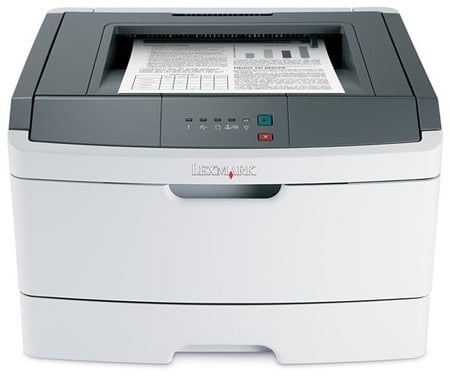
Lexmark's E260DN: unobtrusive - if unexciting - looks
Simple lines in off-white and dark grey mean the E260DN fits in unobtrusively in most locations. Although it has a fairly substantial footprint for an A4 printer, it sits quite low on the desk. Its design is as conventional as its looks, with a 250-sheet paper tray drawer at the bottom of its front panel and a pull-down cover above that, serving as a single-sheet multipurpose tray.
Output is fed to a depression in the top of the machine, and for some reason Lexmark has included a strange piece of bent wire which sits on top of pages as they feed out. We could see its purpose, if this was a phenomenally fast printer which would otherwise throw paper out over the front and onto the desk. However, although it has a fair turn of speed, the E260DN shows no signs of unwarranted paper spew.
The control panel is no more than five LEDs and two buttons, but since there are no walk-up-and-print facilities and everything is controlled from the software running on your computer, this isn’t too much of a disadvantage. The indicators cover the usual printer status needs, such as low toner and paper jams. The buttons restart and stop a current print job.
At the back, as well as sockets for USB 2.0 and 10/100Mb/s Ethernet, which were to be expected in an ‘N’ - for 'network' - suffixed machine, there’s a ye olde parallel port. It’s hard to believe there are many places using PCs with parallel ports but no USB, but it may be easier to slip this machine into some slow-turnover or non-PC environments as a result.
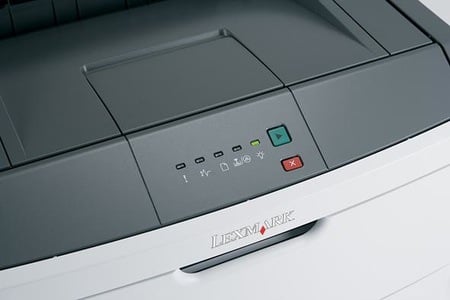
No LCD on the control panel, just lights
Fold the whole of the front panel down and you can get at the two-piece drum and toner cartridge, which slides in from the front. The drum is rated at 30,000 ISO pages, which is a healthy life for a machine in this class, but the toner cartridge is only good for 3500 pages, which is on the low side. The toner cartridge clips onto the drum, so both consumables slide into the printer as one.
COMMENTS
@Anonymous Coward
A couple of points on your comment. The fact that you and Anthony have experienced excessive toner use on two Lexmark printers (which sound, from your descriptions, as if they may well be using the same colour engine) doesn't mean you can extrapolate to other machines in the range and to mono lasers, such as the one reviewed here. Secondly, to lay it at Lexmark's door, you'd need to show that other makes of printer don't show similar extravagant use printing the same document set. It could be some other factor which is causing this excessive usage.
I have no particularly love of Lexmark, but have used a mono laser printer of theirs along with others from Brother, HP and Xerox, printing a variety of different document types, for over 10 years without any signs of undue toner use. I'm just one customer, as are you. If this kind of toner use were commonplace, I'd expect knowledge of it to have filtered through the customer base very quickly.
@ Simon Williams
We were already aware of how yields are determined. Their better printers keep track of percent coverage per page and per cartridge, this can be compared against the ISO test pages and is shown to be accurate. It is definitely not why we (our business, I can't speak for Anthony's use) ran out. I would expect Anthony also realizes that if pages had 100% color on them (which is what it would take, 3000/600 = 5X the expected 5% coverage, with 4 cartridges. 5 x 5 x 4 = 100% coverage to empty them all by the 600 page mark, that they wouldn't last very long and wouldn't have made the remark.
Quite simply, our business printing wasn't using much color, used substantially LESS color per color page than the ISO test page. The printer dumped the toner into the recycling bin at an alarming rate, not onto the pages which looked fine. You are describing a normal situation and we are telling you about an abnormal one that has robbed us of hundreds of dollars worth of toner, as well as all the down-time trying to get some resolution.
@ Everybody
The page yields quoted by Lexmark are from tests run to ISO/IEC 19752, the international standard for page yield tests of laser printers and multifunctions. It uses a standard set of page images, which may not match yours for coverage. This is why you may get fewer pages than the spec sheet suggests. However, if every manufacturer quotes figures produced from the same test regime, they should all be 'off' by the same amount. Not really one you can level at Lexmark, alone.

IT infrastructure monitoring strategies
Agentless Backup is Not a Myth
Top 10 SIEM implementer’s checklist
Steps to Take Before Choosing a Business Continuity Partner
Enabling efficient data center monitoring