
Asus ENGTX285 TOP overclocked graphics card
Nvidia's new GeForce GTX 285 makes its debut
Review Asus' ENGTX285 TOP graphics card is based around Nvidia’s latest graphics chip, the GeForce GTX 285. This is the GT200b core, which is a die-shrink from 65nm to 55nm of the GT200 that was the basis for last summer's big Nvidia release, the GeForce GTX 280.
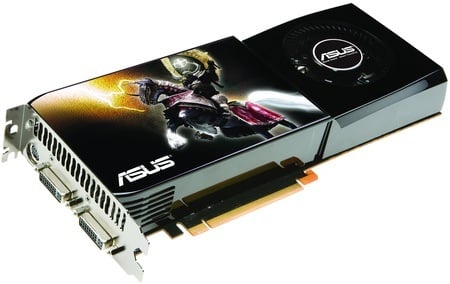
Asus' ENGTX285 TOP: factory overclocked GTX 285
All of the features in the older chip have been carried over to the new one, so the GTX 285 still supports DirectX 10.0 and OpenGL 2.1, has 240 unified shaders, and memory support runs to GDDR 3 rather than the spiffy GDDR 5 that AMD uses in the Radeon HD 4870. Display processing is still managed by an NVIO2 core with support for twin DVI ports and HDMI. DisplayPort still isn’t included.
The smaller fabrication process has reduced the size of the GPU, bringing down the production cost and the power consumption. This has given Nvidia some leeway with the GTX 285's power envelope, and it has to chosen to increase the clock speeds while maintaining the same cooling parameters as the GTX 280. Lay a GTX 280 next to a GTX 285 and you won’t be able to tell the two cards apart as the hefty cooling packages look identical.
Surprisingly, Nvidia has been able to reduce the maximum power rating of the GTX 285 to such an extent that it has two six-pin PCI Express power connectors instead of the six-pin and eight-pin connector combo that we've seen in the past. This is a relatively minor change if you only plan on running a single graphics card, but anyone considering GTX 285 in SLI mode should be ecstatic as power supplies with four six-pin connectors are relatively commonplace.
A reference GTX 280 has feeds and speeds for the core, memory and shaders of, respectively, 600MHz, 2200MHz and 1300MHz. These step up to 648MHz, 2484MHz and 1476MHz with the GTX 285 which suggests a ten per cent increase in performance.
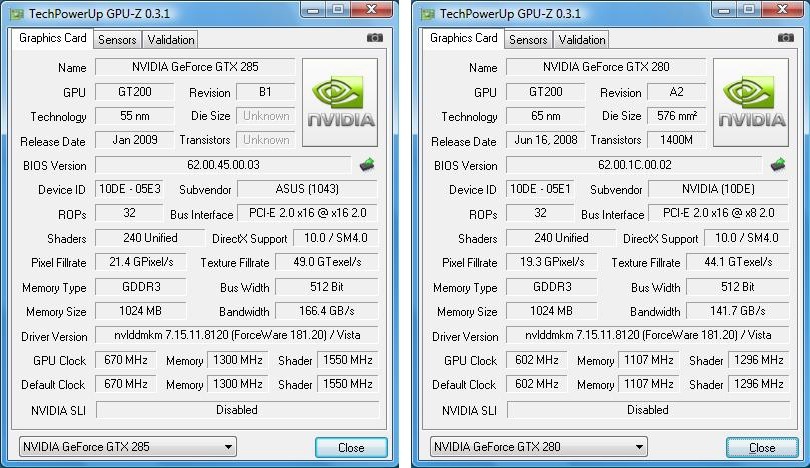
The Asus TOP is overclocked at the factory and runs core, memory and shaders at 670MHz, 2600MHz and 1550MHz. That, in turn, suggests that it should be four or five per cent faster than a stock GTX 285 and 15 per cent faster than a reference GTX 280. That is indeed what our test results show, but let’s not get ahead of ourselves.
COMMENTS
Is there any need for this much power?
My Q6600 / 2 x 8800GT 512MB SLI box is coming up to a year old now and I'm still playing pretty much everything with all the settings maxed.
Even Crysis worked very well indeed (30+ fps) with everything on Very High, albeit at 1280 x 1024 resolution. I just knocked it down to 1024 x 768 for the final boss.
Thing is, a 8800GT SLI setup costs a fraction of one of these cards and yet it really isn't that far behind when it comes to real life gaming. My point is, it really doesn't have to cost the earth to be able to play the latest PC games and whilst I do have a PS3 as well as my gaming PC, I wouldn't want to be without either. WipEout isn't really comparable to Crysis, is it?
re: @Francis Boyle
I can only second Brandon's comments - you're on the wrong side, mate! The 4850 is a brilliant card capable of handling anything that Crysis can throw at it and more (and that's at 1600x1200 with the quality settings turned up to the max). The 48xx series killed the "but can it run Crysis" joke stone dead. Sure, it took a while (well, 7 months according to my calculations) but then Crysis is hardly an average game. Face it we've never had it so good. Sounds like you contracted a bad case of nostalgia there.
ATI still a better deal...
I'm running farcry 2 on all very high settings on a measly ATI 4850 w/ a 3.8ghz E8500 supporting it, and it's great! (and I'm very particular about good framerates) My point is, if you're looking to play all the best games at more than playable framerates, but budget matters to you, then ATI cards are where it's at! They win on all the "bang for your buck" scales that I've seen. I'm no fanboi either... I actually like nvida better (stereoscopic support, CUDA, and other reasons), but budget wins in 2009 :)
@Francis Boyle
re: part one -
Okay point taken, save perhaps for the fact that I would have liked to have seen a decent frame rate in the first place! I went out quite recently, bought a nice shiny new Quad core Intel (Q9450 or something) 2Gb of ram in it, and coupled that with what I considered to be a good compromise gfx card, the 8800GTS 512Mb. Now why then am I not able to run Crysis over lower medium quality and a sucky screen res. The PC cost me, all in, over £500.
Now compare that with the all-in cost of a PS3, playing, say Wipeout HD. 1920x1080 progressive, a great frame rate out the box, all in price - aroundabouts £300 + 12 pounds for Wipeout HD off the PS store!
See my point?
re: part two -
I think you''ve proven my point - a preview of hardware in 6 months time - all well and good except, as far as I can tell, the PC game development industry seem to be writing games that run well only on PCs 6 months in future, i.e. they are too far ahead of the game. Actually more like 3 years in the future as crysis isn't what I'd call a brand new title any more, so why is my relatively new PC unable to run it at full whack quality settings? Think back to your doom/quake/half life days, give it six months to a year, and pretty much any mid priced complete system could run them well.
Its not like I'm new to building custom PC setups either.
@Stu
Stu, agree with the highlights. All valid points and in utopia your suggestions would work well - homogenize the graphics market and you will give game designers the option to get the best out of the hardware. Right now they're crippled by the APIs and never get time to discover the tweaks that would unlock their capabilities/ Exhibit A: the marked improvements on graphics quality from the first PS2 games to the latest (and extend to exhibit B-Z for every other console out there in history). Also goes against the "IBM-compatible" model where you can have any conceivable combinations of hardware.
However it would crush innovation in the market. ATI and nVidia don't make radical leaps very often, they work by gradually improving, tweaking and nurturing their products - taking notes out of each development to come up with new reference models (their big leaps) but again this is learnt from the gradual progression. And making a single new board costs millions, making the next one costs pennies so they flog them. Similarly, the dodgy ones that come off the production lines are underclocked, faulty stream processors disabled and flogged at a cheaper price.
Never forget that without this development, the XBox 360 and PS3 wouldn't exist in their current format, they absolutely benefit from this progression by grabbing the highest performer available (trading off against cost of course). Also, witness the profit margins that shift. NVidia and ATI can only recoup their costs through hardware sales. Sony and MS can take a loss (and historically do) on the hardware and recoup in the games. So you get powerful consoles costing relatively little money (compared with equivalent PC) but more expensive games. Conversely PC games come in at the more healthier ~£30.
And then, we'd need to see ATI and nVidia agree to slow down. Would work for a minute before one of them broke ranks and flogged a 1% improvement model, starting the cycle all over again. :-)

