The Register® — Biting the hand that feeds IT

Feeds
80%

HTC S740 Qwerty keyboard smartphone

An HTC for touchscreen-phobes

  • print
  • alert

Review At first glance, HTC's S740 looks like a revamped version of the slim'n'sexy Touch Diamond, but with a numeric keypad and a pull-out Qwerty keyboard. Even the angled back is similar to the Diamond's. But when you pick it up, it soon becomes clear that the differences go much deeper.
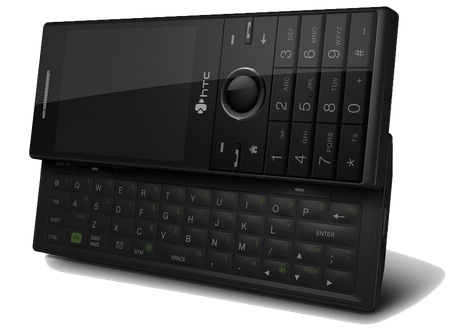
HTC S740

HTC's S740: not a Diamond rehash

The screen isn't touch-sensitive, for one thing, and the device is much heavier at 140g - the Diamond tips the scales at just 110g. But it is very slim, measuring 116 x 43mm face on, which goes some way to make its chunky 17mm depth feel less than it is.

HTC's other recent releases have all been in the Touch series, which the S740 most definitely isn't. So as well as no touchscreen, there's no Windows Mobile Pro operating system. Instead, there's a smallish, 2.4in screen with 320 x 240 resolution – a perfectly fine for a screen this size.

There's none of that fancy TouchFlo interface malarkey like you get with the Touch series. Instead, there's HTC's 'Sliding Panels' interface, which isn't as flash, but at least is a cut above the bog-standard Windows Mobile 6.1 Standard grid - though that's lurking just behind the panels if you prefer it.
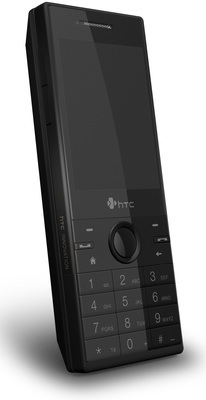
HTC S740

Flat, tricky to distinguish keys

Beneath the screen are a circular navpad flanked by call start and stop keys, two soft-menu keys, and home and back buttons. Below those is the numeric keypad, which has well-spaced keys despite the S740's slim dimensions. A small space between the bottom row of keys and the edge of the phone means all are easy to access with your thumb, though the keys are very flat and not very distinctive when you're trying to select them by touch.

Latest Comments

Eh?

Is it me or are those 'photos' computer generated? The shine across the number keys and the general anti-aliasing just doesn't look right. Nor does it that the phone isn't turned on.

Not really good for the cred there reg. Fake photos? Whatever next?

0
0

Am I th only one who noticed..

There is not a single pic of this thing switched on and no pics of the interface?

I really wanted to see what it looks like, you know, in use.

0
0

Not as good a phone as claimed

I used this phone for a week and I took it back.

The Send/End keys are too small and hard to find, making it very hard to do its main function which is being a phone.

Like many sliders the top row of keys (in this case 2 soft keys) is way too close the the edge of the top half when opened. You end up using your nail half the time to hit these keys.

The only NAV buttons are on the top half of the slider in the middle of the top half. Try reading a web page and scrolling down. You having to awkwardly reach up from the QWERTY where you have to hold it when open anyway. Do this for about 10 web pages on 4-5 sites and you will want to scream. Add to that the way too small NAV ring and navigation on this device is just plain broken for ease of use.

Next the QWERTY keyboard is IMHO terrible. The keys feel mushy lacking a tactile snap and worst of all they lack sufficient "bumps" to find the difference between keys.

Finally the aggressive power management is insane when it comes to key backlighting. Try using this phone in the dark. On other phones like the Moto Q9 I am able to reactivate the key board backlight with a tap to the 4way nav keys. On this device that does not work for the QWERTY, you have to hit something on ITS keyboard which in this case is a letter or soft fn keys and like I said above given the lack of humps on the keys even if you about where a key is in the dark, you can't find it until you get the keyboard lit. I've tried to use the keyboard in a dark car while a friend was driving and I wanted to through it out the window.

It does have a nice feel and I coveted it when I saw someone with it, but one week of use and it went back and I dusted off my Moto Q9. I know keyboards are highly personal in preference but I really suggest you try navigating a web site and see how hard it is to get the keys to light up when u r in the store. I really wanted this phone to be "the one" but sadly it fails in basic usability unrelated to the software.

0
0

Re: David Evans

Sorry David, completely different. This uses Windows Mobile standard edition. As mentioned in the review, it has no touch screen and you cannot create or edit office documents (well, you can with third party software - but not as standard).

The Xperia is a Windows Mobile Professional device which means it has a touch screen, a full version of Office Mobile (you can create and edit office docs) and is also quite a lot larger ad heavier with a significantly larger/higher-res screen.

The XPeria is aimed at road-warriors, this is aimed at people who want a phone-sized device that is also good for email.

0
0

Ewee

What an ugly looking yoke.

0
0

More from The Register

 breaking news
Apple cored: Samsung sells 10 million Galaxy S4 in a month
Beware of South Koreans bearing Android
Microsoft reveals Xbox One, the console that can read your heartbeat
Upgrades Live service – and no always-on requirement
US boffin builds 32-way Raspberry Pi cluster
Beowulf cluster built for the price of a single PC
Review: HP Pavilion 14 Chromebook
All roads lead to Chrome?
Euro PC shipments plummet into bottomless pit of DOOOOM
11th quarter of decline, 20pc drop on last year - Gartner
Fairphone goes on sale to all
The Android handset that's PC can be yours
Nintendo throws flaming legal barrel at YouTubing fans
All your walk-through vid revenue are belong to us

Hands on with Hyper-V 3.0 and virtual machine movement

Our award-winning Regcasts have teamed up with training provider QA for the deepest of deep dives into Hyper-V, including a live demo.

Understand VM movement - just click to play, or go here for a bigger version.