The Register® — Biting the hand that feeds IT

Feeds

Man buys new MacBooks, pulls them to bits, takes pics

Autopsy conducted

Hardware hackers have already got their mitts on Apple's latest MacBook and MacBook Pro laptops - and taken the new notebooks to bits.
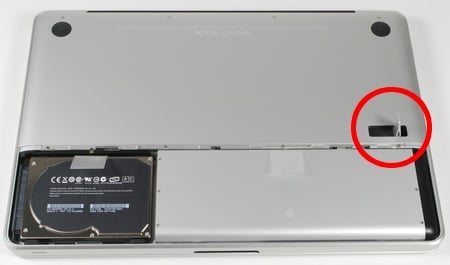
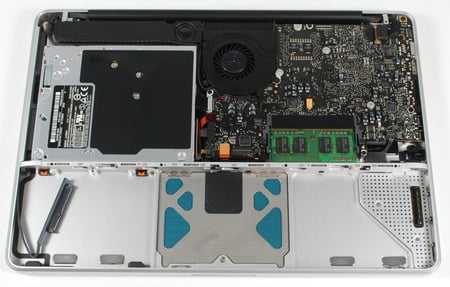
Inside the new MacBook

Top: Flip up the catch (highlighted) to reveal the battery and HDD
Then the innards...
Pictures courtesy iFixit.com

Actually, it looks quite easy: push in a flip-up catch to release the battery cover and you have access to the MacBook's battery and - retained by a single screw - HDD. Remove these and the remaining case screws, and the memory, logic board, optical drive, speakers and so on are right before you for inspection and removal.
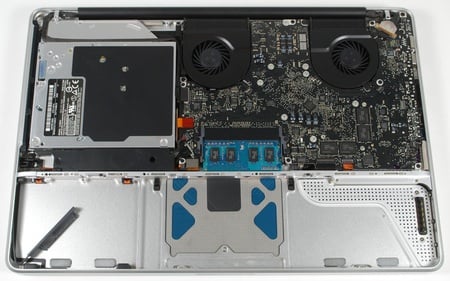
Inside the new MacBook Pro

Inside the new MacBook Pro

Computer repair and spare-parts specialist iFixit, which conducted the disassembly of both new MacBooks, found that the bigger MacBook Pro is opened in the same way.
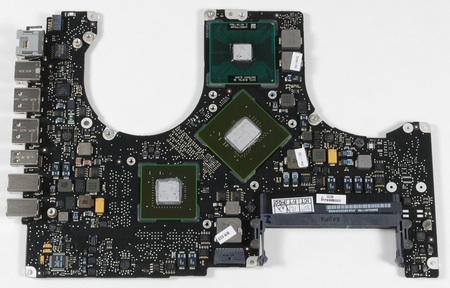
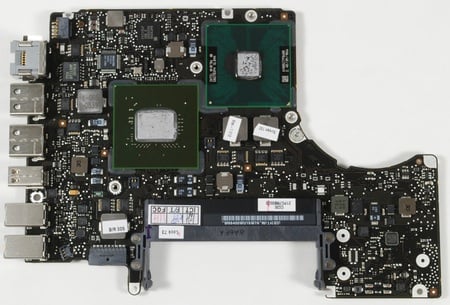
Inside the new MacBook Pro
Inside the new MacBook

The MacBook Pro mobo (top) and its little sibling's mainboard (bottom)

As iFixit notes, you can easily see the MacBook Pro's CPU, integrated chipset and discrete GPU part. The curved gaps are where the cooling fans go.
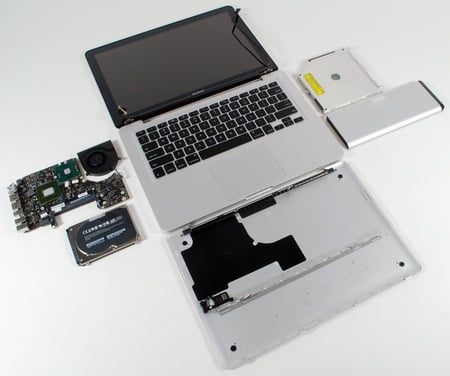
Inside the new MacBook

MacBook autopsy completed

Interestingly, the new notebooks use SATA optical drives rather than the parallel ATA-connected ones of old. And Apple's fitted the 802.11n Wi-Fi card into the screen assembly rather than the main body of the laptop.

Speaking of the screen, iFixit notes that the new aluminium-and-glass assembly weighs slightly less than the previous MacBook's plastic screen. But that glass makes the displays on both models very reflective.

You can see many more shots of the new MacBook Pro's insides - hi-res pics too - over at iFixit's website. Here's the link for the MacBook exploration

Latest Comments

@ Webster pREkTARD

One & time again young man, you simply reinforce the fact you are a mentally retarded numbskull. Perhaps you need your nappies changed more often?

0
0

PEBKAS

@Webster Phreaky Well Webby, my old mucker, if it was as bad as you say why the fcuk did you keep buying them after the first couple of Macs? I reckon you should check your computing environment. Maybe it's because you get so hot under the collar...

@Mac reliability . You say 'surplus' , any surplus I've ever seen in those situations usually means fcuked, that's why they're surplus! Otherwise you can't prise them out peoples hands.... So stands to reason they're going to have problems.

I've worked on Macs since around 1994 and the real only bastard child was the 5300 laptop, which really was a POS. The odd manufacturing fault can happen to anyone (batteries, for example??) and most computer manufacturers farm out production to a small number of the same factories. It's the QC that comes into play and that's where Macs tend be be better.

Here's report about the leading reliable computers being IBM and Mac (by some margin).

http://www.macworld.co.uk/news/index.cfm?RSS&NewsID=16183

(I tried to find other references to this other than Macworld but failed...)

I can't be bothered to find other refs but I know they're out there.

Didn't PC World vote the MacBook Pro best PC?

/Flame on!!

0
0

Mac reliability

I *also* agree with Webster. I work on surplus computers from the university. Dells? Low failure rate, I got some GX260s with blown caps for a while but even counting them the failure rate's been well under 10%. Macs? It's around 75% failure rate -- that's being generous. The LCD Imacs are fairly reliable. B&W G3s are reliable, but too old for many to want. The G4s that are like a G3 case except grey are reliable. Oddly given the high heat, the few Cubes I saw were reliable. Laptops? Awful reliability. Desktops? I've gotten over a dozen "dual" processor G4s, without exception the second CPU was burned up. On some the first CPU also burned up rendering the whole system inoperative. Sound failures. Power supplies. Motherboard failures. We practically had a party when we got Ubuntu network installers working, on SO MANY models the CD-ROM or DVD-ROM will read a burned disk for maybe 5 minutes, then just start returning corrupted data (it doesn't properly indicate a CD read failure, so OSX seems to sometimes just install corrupted files, and Ubuntu will stop with various errors about corrupted packages). (After wiping the hard disk to meet security requirements, we cannot put OS X back on due to licensing problems.)

Some models just last and last. But it really seems to be a crapshoot, and there's simply no way to pretend Apple is some paragon of reliability. Well, I mean, there IS a way, but it involves Steve Job's reality distortion field.

0
0

The big question

of course is: Will it blend?

0
0

Note to self...

Don't lend Webster any electronic stuff.

0
0

More from The Register

Is the next-gen console war already One?
Microsoft’s new Xbox - and more
 breaking news
Apple cored: Samsung sells 10 million Galaxy S4 in a month
Beware of South Koreans bearing Android
US boffin builds 32-way Raspberry Pi cluster
Beowulf cluster built for the price of a single PC
STROKE this mouse to make apps POP, says Microsoft
Windows 8 Start button comes to Redmond's rodents
Nintendo throws flaming legal barrel at YouTubing fans
All your walk-through vid revenue are belong to us
Fairphone goes on sale to all
The Android handset that's PC can be yours

Hands on with Hyper-V 3.0 and virtual machine movement

Our award-winning Regcasts have teamed up with training provider QA for the deepest of deep dives into Hyper-V, including a live demo.

Understand VM movement - just click to play, or go here for a bigger version.