The Register® — Biting the hand that feeds IT

Feeds

Netbooks and Mini-Laptops

They're little and we love 'em. But which ones are best?

  • print
  • alert

Buyer's Guide Since Asus launched the Eee PC 701 in October 2007, many notebook makers have hopped on the Small, Cheap Computer bandwagon, a fair few of them pushing the limits of the format's size and price in the process.

The arrival of Intel's Atom N270 processor in June this year kickstarted this profusion of SCCs, and it remains the CPU on which most of them are based. But whatever processor a manufacturer has picked, there's much commonality among SCCs. Memory card slot, two to three USB 2.0 ports, 10/100Mb/s Ethernet, webcam, VGA and 802.11b/g Wi-Fi - these are standard on all SCCs.
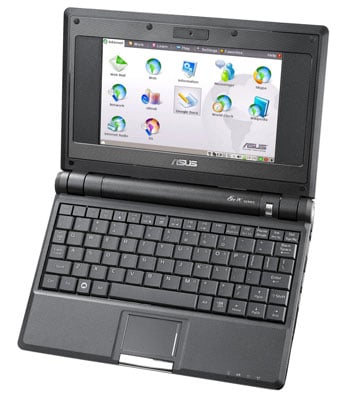
Asus Eee PC 701

Asus' Eee PC 701: the original

The most common screen size is 8.9in, and while there are bigger, 10.2in models out there, they all have the same 1024 x 600 resolution as the smaller models. For us, the extra inch makes no appreciable difference to legibility, but it does mean the laptop is physically bigger.

Hard drives can expand waistlines too, and we'd argue that the solid-state drive is what the SCC is all about: capacity enough for the OS and a sub-set of your data, with the resilience you want from a throw-around machine. That said, there's no arguing that a hard drive will give you a true laptop-like storage capacity.
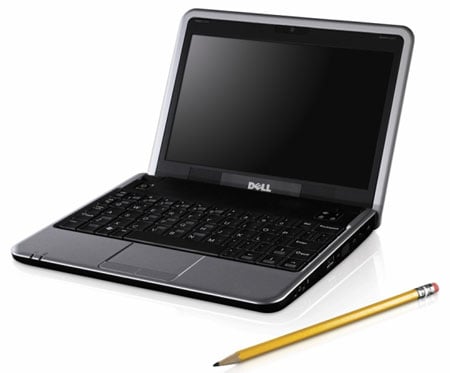
Dell_mini_inspiron_02

Dell's Mini 9: the most eagerly awaited SCC?

Almost all SCC suppliers offer a choice of Linux or Windows XP. The Microsoft OS has the advantage of familiarity, and some hardware won't hook up to Linux SCCs as easily as it will to an XP machine, at least not without some under-the-hood knowledge of the operating system. But the open source OS makes for cheaper machines, and since the SCC is designed for simplicity, their basic, kid-friendly UIs are sufficient for all but the most demanding user.

So here, then, is Register Hardware's guide to the current crop of netbooks...

Next page: Acer Aspire One

Latest Comments

Pleased with my Acer

I made the plunge after pondering for quite some time and opted for the Acer Aspire One. I love it but the article correctly identified the main problems with it which are battery life (not much more than two hours) and the somewhat quirky Linux installation.

I decided against the Dell mainly due to the stupid keyboard layout. The fact that it runs Ubuntu though is very appealing.

The 901 is just too expensive. I know £280 is not a lot of money, but my One cost £199. When I show it off and can say "it was less than 200 quid" I always get the same positive reaction. Saying "less than 280 quid" just doesn't sound as impressive.

Despite what the AC said above, while I do always travel first and business class, my employer pays those fares, I paid for my One so I still care about its price.

What is interesting about this whole sector is how usable a machine can be while remaining truly portable.

My shiny MacBook Pro is on my desk 1 metre away from me but I can't be bothered to go all that way and open the lid; my One just happens to be right here. That's the beauty of laptots (what mine always gets called in our house BTW) they are so small and light that you can have them there with you almost all the time.

0
0

Original laptot

Well before Psion and the other pretenders was the Tandy Model 100 from 1983. Battery capacity was 20 hours on four alkaline AA cells. The real keyboard and inbuilt modem made it popular with journalists.

0
0

Huawei E220

I use my T-Mobile E220 with my Eee, no problem. I believe it's supported out of the box in Xandros, but I'm using eeeXubuntu so I installed the "Vodafone Mobile Connect Card Driver for Linux" (giyf) which works very well, and does all the data logging one could wish. It has repositories for the default Xandros too.

0
0

Alpha 400 vs Maplin Minibook vs Elonex Onet+

Though clearly all based on the same design, there are some differences. The Alpha 400, for example, does its wifi through a USB dongle (supplied) and I think the same may be true of the Minibook. On the Onet+ it's built in (as an internal USB dongle, I suspect).

The Minibook has the webcam beside the screen - on the Onet+ it's (a) above it and (b) irrelevant, snce there doesn't seem to be any software that uses it.

I got my Onet+ last week - as with many others it was a what-the-hell free upgrade from a what-the-hell One+. So far I have been quite impressed. No problems at all with WiFi, pretty good build quality and a surprisingly nice keyboard. I don't know if it's bigger, or brighter, or whether just not having a black border helps, but the screen is much nicer than the Eee 701 on which I write this.

I need to do some experiments with the Huawei - the Onet+ does come with mobile broadband connection software - and then I'll start using it to test it in practice.

And to education customers it's £130. What the hell?

0
0

Mobile internet on Linux netbooks

I have a Linux Asus Eee 701 that I am happy with although the screen is too small. I do check my email on the train via Vodafone's mobile broadband. The only problem is the network coverage that still isn't great. Hopefully the trend with netbooks will put some pressure on the network operators to improve. To get mobile broadband working on Linux is easy, I wrote down a few note on how I got it to work here:

http://www.devcase.com/blog/how-to-use-vodafones-mobile-broadband-on-asus-eee-linux

I hope that can be of help. My guess is that it's not much more difficult with other distros or ISPs.

0
0

More from The Register

Is the next-gen console war already One?
Microsoft’s new Xbox - and more
 breaking news
Apple cored: Samsung sells 10 million Galaxy S4 in a month
Beware of South Koreans bearing Android
US boffin builds 32-way Raspberry Pi cluster
Beowulf cluster built for the price of a single PC
STROKE this mouse to make apps POP, says Microsoft
Windows 8 Start button comes to Redmond's rodents
Nintendo throws flaming legal barrel at YouTubing fans
All your walk-through vid revenue are belong to us
Fairphone goes on sale to all
The Android handset that's PC can be yours

Hands on with Hyper-V 3.0 and virtual machine movement

Our award-winning Regcasts have teamed up with training provider QA for the deepest of deep dives into Hyper-V, including a live demo.

Understand VM movement - just click to play, or go here for a bigger version.