Asus P750 Windows Mobile smartphone
If a workhorse wore a suit, it would look like this
Requirements Checklist for Choosing a Cloud Backup and Recovery Service Provider
Review Function over form is the name of the game with Asus' P750. No clever styling, no flash graphic user interface, just robust design, a reasonable specification and decent value for money.
The P750 is a bit of a chunky monkey. It weighs 130g and measures 113 x 58 x 17.4mm, but it feels very robust and solid, and we reckon it could take quite a kicking before anything fell off or apart.
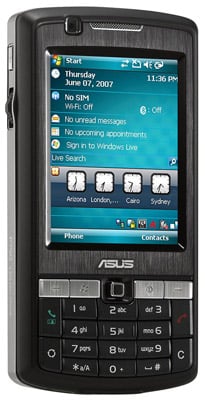
Asus' P750: clear screen, even in bright sunlight
The specification is solid enough too: a three-megapixel camera, GPS, Wi-Fi, A2DP Bluetooth, 3.6Mb/s HSDPA 3G, tri-band GSM/GPRS/Edge, a front-facing VGA camera for video calls and a Micro SD card slot. On-board storage is a somewhat stingy 65MB.
Though Asus' spec sheet lists the P750's Micro SD slot as being SDHC compatible ours flat refused to read data off two 4GB cards. A 512MB card we tried worked just fine, though. As both 4GB cards worked in other Micro SDHC-capable devices, it must be an issue with the handset.
The P750's 2.6in, 240 x 320, 65,000-colour touchscreen is nothing out of the ordinary, but it is bright and clear enough to prove usable in even direct sunlight - helpful if you're going to use it as a satnav rig with the generously supplied in-car charger and screen mount.
COMMENTS
@H
Thanks for that Richard.
We are starting to think that our handset was perhaps non-UK standard or an early model as we didn't get the H signal icon in any of the places we expected it (and where we had it on a K850i and HTC Touch Dual, all three using T-Mobile sims which we swapped about to double check). Also the user guide to all the icons that can appear on the screen also made no reference to the H icon. This may explain our MicroSDHC issues too.
Looks boring, sounds interesting
Finally, someone manages to combine 3G, WiFi, touchscreen, a solid keypad and the ability to take SD Micro (albeit not necessarily SDHC) into one device. Wonder how much weight dropping the mediocre camera would have saved, though...
I get the 'H' all the time
Wrong on no 'H' icon. You're not getting HSDPA. This is a problem with providers. I had to fight with T-Mobile techs to get them to 'activate' my 'enabled' HSDPA. This was after fighting with the Customer Service agents who swore I had to pay another £10 pm to get it.
If you're on T-Mo, you show 3G until an actual data transfer starts with GPRS. Then if the signal has 3 bars, it will switch to H.
I get the 'H' on P750 with T-Mo at my desk on the 9th floor at Canary Wharf, and speeds from 900K to 1.3M bps.
Richard

IT infrastructure monitoring strategies
What you need to know about cloud backup
Enabling efficient data center monitoring
Agentless Backup is Not a Myth
Top 10 SIEM Implementer’s Checklist