Google evaporates Docs and Spreadsheets cloud
Try again in 30 seconds. Or an hour
Customer Success Testimonial: Recovery is Everything
Updated Google's Docs and Spreadsheets disappeared today for close to an hour, proving that the world's largest search engine is a long way from perfecting the art of online business applications.
Many businesses paid good money to look at this screen, which appeared - at least to people in Silicon Valley - from about 9am to 10am:
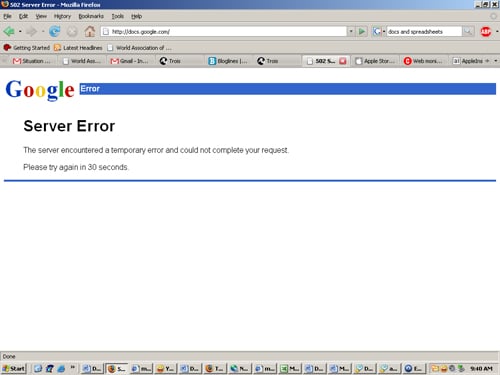
When clouds die
As a Google Apps Premiere customer, the San Francisco-based open source outfit MuleSource pays Google for the use of Docs and Spreadsheets, and it describes the experience as a game of chance. "As businesses look to move their systems and applications into cloud-based services, we expect them to work minimally as well as if we ran them ourselves," Mule Source CEO Dave Rosenberg tells us. "With Google Apps, we are at the point of taking bets to see if the services will actually be up."
Google's error message kept telling Rosenberg to "Try again in 30 seconds." Say what you will about Microsoft Office, it's never that cruel.
We've asked Google why its cloud died. But it has yet to respond. ®
Update
Google has responded, and the company wants you to know it fully realizes that when people pay for something, they expect to have access to it. "For a short period this morning, our users had difficulty accessing Google Docs. Some Google Apps users were also affected," the company says. "We have now resolved the problem. We know how important Google Docs is to our users, so we take issues like this very seriously."
COMMENTS
LOL!
LOL @ a Reg hack running AdBlock Plus - adverts on the site too annoying?
Reasons why I don't use Google Docs
One hour of downtime in a year is pretty impressive for any service, so it's a little bit unfair to cite this problem as a good reason not to use cloud applications.
There are much more compelling reasons not to depend on them:
1. My desktop applications still work even when I'm without internet access or otherwise unable to access the server. The application provider usually isn't the weakest link in the chain.
2. If I really need to have portable document editing, I'll just use a big USB key with portable applications installed.
3. My data is my own. I know where it is, I know how, where and when it's backed up. If I choose to delete a document I know it's gone, within reason anyway. If I really, really want it gone, there are ways to make it so. If I choose not to delete it, I know I'll still have access to it 20 years from now. Whether I can read it is another story, but steering clear of proprietary formats in recent years has made it more likely that I *will* be able to.
4. When the Orwellian nightmare we call a government these days decides it wants to go trawling through everyone's data "for public safety, because terrorists write documents", mine isn't going to be caught in their nets. I really don't have anything to hide, but that's no reason to make life any easier for Big Brother. Who knows *what* they might decide is verboten in the future...
5. I'm not some Web-2.0 dreamer with my head in the Cloud, who actually believes that the internet is this great pervasive always-available thing which will solve all the world's problems. The internet sucks, pretty much. It's just better than what we had before. There might come a day where cloud computing is a technically viable option for everyone, but it's not here yet.
Even if the service had 100% uptime, and reliable internets were available everywhere, #3 and #4 will always be good enough reasons for me not to trust my personal data to the Cloud.
There's one exception here: I *do* use Gmail, on the basis that whatever email provider I use, I have no control over what happens to my email before I pull it off the server anyway, so I'm under no illusions of privacy or uptime where that's concerned.
horses for courses
backing a domain into google apps for email management is great.
the rest of apps (incl. the very bad html editor/publisher) is pants.

IT infrastructure monitoring strategies
Agentless Backup is Not a Myth
Top 10 SIEM implementer’s checklist
Steps to Take Before Choosing a Business Continuity Partner
Enabling efficient data center monitoring