Sony Ericsson Z770i mobile phone
Waving the flag for flip-phones
Review Fans of clamshell phones may feel a touch hard done by when it comes to Sony Ericsson. Despite some desirably stylish Walkman and Cyber-shot designs, the real style icons to date have tended to be candybars.
The Z770i is its attempt to redress the balance. It's constructed with a smart, elegant look rather than brash style-statement chic. It comes in a black or brushed metal-look silver casing, with just a touch of contrasting colour accents.
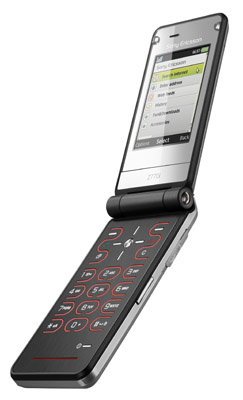
Sony Ericsson's Z770i: stylish
The Z770i also has an extra bit of poke under that bonnet, with HSDPA 3G connectivity inside enabling fast web access and over-the-air downloads.
It has a typical mid-range spread of features, including a multi-format music and video player, an FM radio and a two-megapixel camera. Google Maps software is pre-loaded for navigation and location-based services, although there’s no built-in GPS receiver. RSS news feeds are supported too, and Sony Ericsson has furnished the Z770i with its useful email wizard to make setting up new accounts a breeze.
Surprisingly, video calling isn’t supported - there’s no secondary camera for face-to-face conversations. Of course, for most mobile users video calling is a rarely, if ever used novelty they wouldn’t miss, but its absence it still a surprise.
Semi-concealed secondary displays are the in-thing at the moment, and Sony Ericsson has slipped one beneath a mirrored strip across the handset's lid. The small, mono display that shines through shows basic time, status and incoming caller or message ID info rather than anything cutting edge, but adds to the tidy design feel.
The Z770i is slim for a clamshell, measuring 15.5 x 93 x 48mm and weighing a pocketable 91g. It feels comfortable to hold and use. It has a flat surface with keys separated by rounded backlit grooves. It’s quite striking, with a distinct hint of the original Razr about it.
COMMENTS
more: partial review
Posting as AC as I used to work for Motorola and don't want to get into a slagging match.
I think that if you're of the opinion that syncing just works then you haven't tried hard enough, and in particular you haven't used Motorola's offering! They still use their own app which is the slowest most pants solution ever. I have little doubt that it works on a virgin install but you try making the damn thing work once your data's been on a few phones and you're trying to wipe, resync etc...
And whilst I'm having a bitch about syncing, does any one else have a problem with
Google Calender -> GCal daemon -> Mac cal -> N95 syncing?
In my experience it can't tell two, day long, events apart on the same day if you delete one and then add a completely separate new one. I'm pointing my finger at the Nokia isync plug-in as the damned mystery event only appears on the N95 having been expunged from Google calendar and Mac Cal bloody ages ago.
/rant
@Tony Smith: partial reviewage
Tony, I'm glad for you that you happen to know that:
"These days, this stuff works, and while Vendor A's software may be slightly better than Vendor B's, no one's going to buy Vendor A's phone solely as a result of that."
...but some of us don't (or didn't) know that. I'm a SE user with no idea how good Nokia or Sanyo's Mac connectivity (say) is.
A brief reminder of what the problems/issues/limitations are each time would still help us, and would keep your reviewers honest (they'd have to check for improvements and new limitations). It is, as yer man said, a major part of the functionality. (If, as an example, a phone's PC software requires XP SP2, say, tell us - I know people unable to upgrade from SP1, for whom such a phone would be useless.)
@AC, re. partial reviewage
Fair point, AC, but I think World+Dog has established how phone interact with PCs, and Mac users have come to expect they'll often need to do a bit of iSync tweaking to support new handsets - or buy a third-party plug in, as you did.
There's little point rehashing coverage of, say, Sony Ericsson's PC software *every* time we review an SE product. Even more so all the phones that just use Microsoft's ActiveSync.
These days, this stuff works, and while Vendor A's software may be slightly better than Vendor B's, no one's going to buy Vendor A's phone solely as a result of that.
So, instead, we focus on the more tangible reasons that punters *do* buy phones for, though we'll always point it out if a Bluetooth sub-system is below par, or there's an obvious issue with content syncing.
Convergence
@ eddiewrenn - couldn't agree more. We want a phone with a high quality camera AND a decent music player (preferably with a proper headphone socket). A nice big touch screen for internet browsing wouldn't go amiss either. We want one phone that does everything, not pockets stuffed full of devices.
Partial Review
Once again, another 'Register' mobile phone review which makes no comment whatsoever on the phones PC/Mac connectivity options and performance via Bluetooth or USB.
The first thing most people want to do with a new phone is get some stuff onto it - usually as least Contacts and Calendars, but also Music etc.
How does the supplied software perform? Is it easy to sync your Contacts and Calendars to the phone? What about transferring music to the phone, or photo's off it?
Fortunately, I use a Mac, and was syncing Contacts and Calendars to my Z770i within minutes of turning it on, using an iSync Plugin from www.feisar.com.
I don't really understand how a 'review' can completely omit to mention an important part of the whole mobile phone using experience. Perhaps you still enter all your contacts by hand?
