


This article is more than 1 year old
Maxdata Belinea s.book 1 sub-notebook
Hard drive-equipped Eee killer?

First Review Asus' Eee PC has been hogging the limelight thanks to its small size and small price tag. It's also been drawing the attention of competitors, and now there's a stack of would-be Eee beaters coming to market. Maxdata's Belinea s.book 1 is one of the first.
For starters, the s.book comes with Windows XP Pro pre-installed, so out of the box it'll be more familiar to mainstream users than the Linux-running Eee can be. And while it uses the same 7in, 800 x 480 display format as the Eee, the s.book's screen is both touch-sensitive and capable of running at a wider range of resolutions.
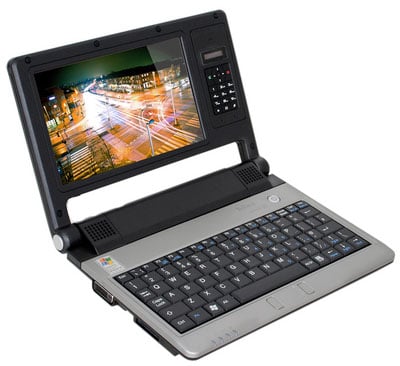
Maxdata's Belinea s.book 1: compact and ultra-portable
And this boy has a hard disk on board: an 80GB unit that offers rather more application, document and media storage than the Eee's meagre 4GB solid-state drive.
The s.book is based on a UMPC reference design, the NanoBook, developed by chip maker VIA last year to highlight its C7-M processor. But Maxdata has tweaked it a bit. The display, mounted to the left side of the laptop's lid, was originally placed alongside a small touchpad, but Maxdata has sensibly moved the navigation device to the slim space in front of the keyboard. In it's place in the screen bezel, there's a pop-out VoIP handset.
The s.book is an attractive unit. The lid's decked out in gloss black, while the rest of the machine is painted satin black. The black keyboard's surrounded by a dark-silver plastic area, home to the touchpad and, above the keyboard, the blue-backlit power button. Beyond this is the screen hinge, home to two stereo speakers, though you'll also find 3.5mm mic and headphone sockets on the laptop's right side.
Maxdata missed a trick by keeping the keyboard – which is the same 21 x 8cm area as the Eee's, with an identical layout – as far forward as it is. There's plenty of room above it, and shifting the keys upward would make room for resting wrists and a larger trackpad. As it is, the 19 x 13mm pad is simply too small, and after a minute or two we plugged in a mouse. The Eee definitely has the edge here.
The Eee has a much nicer screen too. The Eee display is backlit by LED, whereas the s.book has a traditional fluorescent backlight. The difference is immediately obvious when the two are placed side by side. The Eee's screen is crisper and capable of colours of much greater warmth than the s.book's panel.
 Biting the hand that feeds IT

