


This article is more than 1 year old
Apple TV goes to the movies
May be useful after all

Projection on the cheap
Then Dacko thought of Apple TV, which plays high-def content at 1280 by 720 - his film's native resolution. Plugging it into the theater's LCD projector, he could play his flick without a tape deck. "Now that Apple's audio codec does 5.1 audio, I can play a full high-def 5.1 movie off this box."
And he could purchase an Apple TV outright for just $299. "That's less than half what I'd pay someone just to put my movie on an HDCam tape."
All he needed was a way to convert his film to Apple's Apple-centric H.264 video format. And he found it inside FinalCut Pro, the Apple app he used the edit the picture. Using the latest version of QuickTime, FinalCut can now convert to iTunes format with a single click.
Well, a single click and some spare time. FinalCut needed seven hours to compress the file - from 275GB down to a mere 3GB. But once it did, Dacko could copy his movie onto his Apple TV, tuck it under his arm, and carry it to the theater. Toting Apple's 7.7- by 7.7- by 1-inch media player was no more difficult than toting a tape.
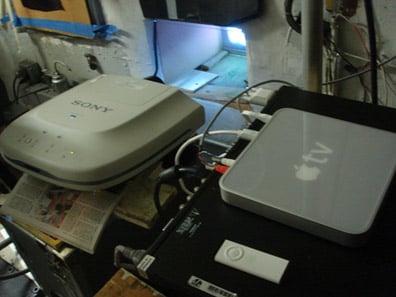
Projection room kludge
In the end, Dacko didn't plug the device straight into the theater's LCD projector. The projector couldn't handle 1280 by 720, slightly cropping the image, so he put a signal processor in front of his Apple TV to set things right, taking the resolution down to 1024 by 768. That's hardly HD, but it's better than Dacko could have done with DigiBeta. And he's sure that with a little tinkering, he could run things without a converter box. "I bought that Apple TV the night before the premiere," he admitted.
As he continues to screen films, he can simply load them onto his Apple TV and lug it from theater to theater, doing away with tapes entirely. "I wish I had thought of this before," Dacko said. "I could just create multiple versions on my movie on Apple TV - in every possible aspect ratio and format. All the theater would have to do is plug it in."
Why not lug a laptop from theater to theater? Apple TV offers projector-friendly AV ports, including an HDMI jack. It uses an interface that even the most computer-phobic projectionists can quickly learn to use. And it's designed specifically for streaming video. A laptop processor can so easily bog down with other tasks.
And, of course, it's cheap. When you're an indie filmmaker, that's terribly important. ®
 Biting the hand that feeds IT

