
Mac OS X 10.5 Leopard - Finder
Part 1 - the new look'n'feel
Review The latest version of Apple's operating system, Mac OS X, is here and it's arguably the most significant revamp since X replaced 9. Leopard brings a new look to Mac OS X GUI, and a wealth of new features, some innovations other merely tweaks to old apps. In the first of a series looking at Leopard in depth, we go straight for Leopard's soul: the Finder.
How the Mac OS looks has always been a key component of its much-vaunted ease of use. It's supposed to be immediately clear what things do and how you proceed with the task at hand. That kind of went out the window a bit when Mac OS X debuted. A case in point: the traffic lights. They're certainly more pretty than Windows' equivalents, but with the exception perhaps of the red light, no more intuitive.
Change for change's sake, in other words, and that's a trend that continues into Leopard. Take the Dock. Out goes the flat launcher, replaced by an ersatz 3D version, complete with glossy sheen an icon reflections. Yes, it'll wow AppleStore visitors, but for users it's too much. The separator between the applications area and the documents space now looks like a zebra crossing. Why? Because some graphic designer suggested it would look cool. But the form has no greater function than before, and it's certainly not a visual clue as to what it does.

![]()
Leopard's 3D Dock...
![]()
... and back again
Fortunately, it's easy to get the old-style Dock back, albeit with the new version's glowing running application indicators in place of the arrows of old. You can also easily disable the 'fan' of icons that pop up when you click a Docked folder. Again, fans are in-store demo eye candy. I've no objection to the new style, but why does a new option have to mean the loss of the old pop-up list, which was easier to read and to select from? Still, at least with the new fan and grid views you can drag files out of that folder.
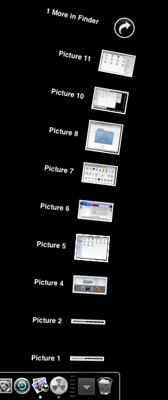
From Dock icon to Fan...
You can select a grid view of icons in place of the fan, which is better - or would be if the icons weren't so huge. Like the look of the Dock, there's no direct way to adjust the icons' sizes to meet personal taste.
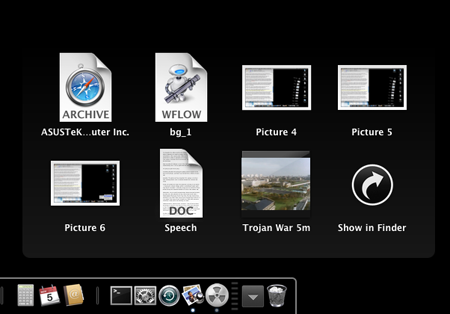
... or to a Grid
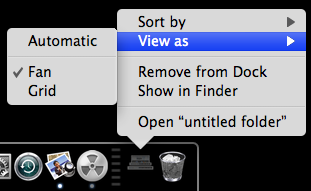
Setting the grid
COMMENTS
RE last post
Sorry, I get it. It's a beta version right? I need to wait for 10.5.1 and just hope my old iMac lasts out..... a few more weeks?
OS X.5 disappointment
Hello, I've just found your nice website when I googled OSX.5 Leopard Crash, (because I wondered if anyone else was feeling disappointed)
I've been using OS X.1.5 since it came out and my machine has crashed 3 times in say 6 years. It then started crashing about once a day 2 weeks ago. So, I bought a new Mac and intalled Leopard a few days ago.
My new machine crashed yesterday and 3 times already today.
What on Earth is going on?!
Yours confusedly and disappointedly
PS I'm a primary school teacher not a techy so it well maybe some thing I've done - I just expected the Mac to be more robust.
switching windows and applications is easy....
or you could try this: http://www.manytricks.com/witch/
in some apps you can alt+tab to change document windows, but not all.
@James Bassett
Actually, I agree with James to an extent. I used Macs at school a lot, so I have always known that the menu bar changes according to the application in focus. This used to be fine when we had the early Macs (Mac, Mac Plus, SE, etc.) with their tiny screens. Back then you always ran an application full screen, and so the menu bar appeared next to the application.
Since LCD technology became cost effective, screen sizes seem to keep going up. We now buy screens with 1680x1050 resolution, but I expect the next set of screens we purchase to be 24" at 1920x1200. With so much screen space, there is no longer any need for people to always run their applications maximised. As a result the menu bar for the application no longer appears near the application itself.
I don't think anyone could deny this is counter-intuitive. It is only natural that different parts of the same application should be put together in the window. I believe Apple are regretting having this layout and would not be surprised if the transparent menu bar is the first step to it disappearing altogether :-)
"flaming" ignorance
I use mac and PCs extensively and am not a "fanboi" of either. They both have their ups and downs. But certain posts need addressing:
@Joe Cooper: Expose works in 2 modes, revealing all windows and revealing all windows in current application. Either can be configured from shortcut keys or mouse commands. If you are an x-coder you should know this.
@ James Bassett: not knowing that the menu bar changes with the application - I agree it's a bit obscure for a newbie, but still.. come on!!
@All the people who complain it's just a cosmetic update: Know your facts!
The entire underlying file system has been changed (hence the applications breaking) to allow for multi-linking to files - which has several advantages, from system searching and cataloging to backup. The BSD kernel has been updated substantially to make it faster and more stable (hence the applications breaking). Boot camp is now native, giving even greater cross-platform support. x-tools has been substantially overhauled. Apache & PHP etc are all updated. The Java module has been integrated into the finder for preview. In fact the interface tweaks are only minor, relative to the under-the-hood updates (hence the applications breaking).
@The people be-moaning the lack of NAS support in Time Machine: Time machine is a very cleaver program that uses multi-linking to keep a complete version of every file ever written in a set of time-indexed directories that are complete and browsable from (even outside of the time machine app), but yet doesn't take up too much room. It's a massive step forward for hard drive backup - requiring a completely new file system, which needs to be managed by the OS on the external drive. So it was NEVER INTENDED as a network backup solution, but rather a hard drive backup solution. If you need network backup, other solutions can be employed.
BUT YES - there is a lot of room for usability improvement in OSX. Leopard is a step in the right direction with the new finder and spaces, but these do come off as a work around, rather then a usability paradigm shift. Even Woz was quoted as saying recently that Apple have long since dropped it's focus on perfecting the Human Computer Interaction and that the visual effects don't add anything to usability. A real shame, I think - because it's a thing that nobody is addressing in computing... in general OS usability is abysmal across the board. That said, if you know your mac keyboard shortcuts, OSX is easier to get around then windows.
