The Register® — Biting the hand that feeds IT

Feeds
85%

Slingbox Solo TV-over-the-net device

Slingbox pared back to basics

  • print
  • alert

Review Sling Media's Slingbox Solo is for all those folk who already have a digital TV set-top box and don't fancy forking out for a local network and internet video streaming gadget that has an on-board tuner of its own.
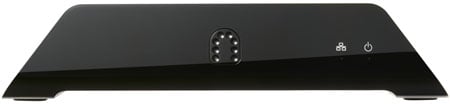
Sling Media Slingbox Solo
Sling's Slingbox Solo: tuner-less

The Solo sports the usual truncated triangle look of all previous Slingboxes, but this time it's kitted out in shiny black plastic with a similarly coloured metal mesh on top to aid cooling. The front's home to just power and network activity indicator LEDs because the back is the business end. Here, you'll find a 10/100Mbps Ethernet port, a non-functioning USB connector - "reserved for future use", Sling ominously states - and an array of RCA stereo, composite-video, s-video and component input ports, mirrored by an identical set of outputs to provide pass-through to your TV.

Sling bundles a pass-through Scart adaptor in the box which connects up to the Solo's composite ports. You also get composite-video and stereo audio cables, but there are no component or s-video leads. The packaging does include an Ethernet cord and the infrared transmitter the Solo uses to control your video source.

The key fact is there's no aerial socket because the Solo expects that to be handled by one of the other devices in your living room. In our case, we hooked it up to a Humax PVR-9200T, but it's ready to accept feeds from Sky HD boxes, Apple TV units, DVD players, whatever. The only limitation: you can only activate one set of inputs at a time.

That choice is applied during the set-up phase, which is just a matter of connecting the Solo to your router - wired only; this is not a wireless-friendly product - and installing the playback software on your computer, be it a Mac or a PC. Just check that you're computer's firewall is open on the TCP and UDP ports - 5001 - that the Sling system uses.
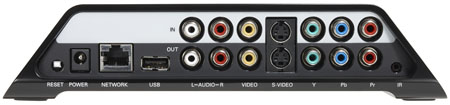
Slingbox Solo
Sling's Slingbox Solo: a plethora of inputs and outputs, but you can only use one set

And if your router's not set to operate using the UPnP protocol, you may need to tweak its settings to expose the Solo to the outside world - but only if you want to view its signal beyond the reaches of your own, local network.

Incidentally, if, like us, your broadband connection or your router isn't plumbed into the living room, the Slingbox - of any type - is an ideal application for Powerline Ethernet networking-over-the-mains technology. We used a Netgear XEPS103 four-port powerline adaptor - reviewed here - and a Devolo dLAN Microlink adaptor - reviewed here - to bridge the gap between Solo and router, and Sling Media has its own Sling Link adaptor which does the same job. All of these are based on the 85Mbps HomePlug powerline standard.

Latest Comments

Do yourself a favour...

Why spend £125 on a single input Solo device when you can get 3 selectable inputs with Freeview and analogue decoder for £97.

The Slingbox is a great bit of kit, but the Slingbox Solo is all about selling less equipment for more money. If you want a Slingbox, do yourself a favour and get the old version from Amazon before the stocks run out...

Unless you plan to make use of the 8MB features - and I suspect few would - the new range is nothing short of a complete rip-off!

0
0

@ David Lurie

The Wii can do this with ease.. Just download the 'internet Channel' AKA Opera for the Wii and then load TVersity (tversity.com) on the PC from which you want to stream, and away you go..

0
0

sling catcher

Supposedly the company that makes the slingbox is also coming out with a gadget called something like the sling catcher which should be able to take slingbox generated network traffic and display it on a tv, amongst other neat tricks.

http://www.reghardware.co.uk/2007/09/27/sling_names_slingcatcher_release_date/

It was displayed at a trade show earlier this year and was due around the middle of this year, but has been apparently delayed by a few months.

-- gyre --

0
0

@ David Lurie

X10 sells a "video sender" system here in the USA that is probably more-ore-less what you're looking for for.

Many caveats:

1. Don't visit X10.com without major spyware and virus protection. Don't use Internet Explorer for it, either.

2. Their system is composite only - no S-Video, no SCART, no RGB.

3. I had the old version and inadvertently hooked up the wrong wall wart, which let the smoke out. If you get this, or a similar system, be sure you keep track of which wart goes with which unit (a simple tape-and-magic-marker system should do it).

4. The x10 Web site is easily the ugliest and least-well-organized I have ever seen, beating out many Government sites in that regard. Peril-sensitive sunglasses are recommended.

I'd be interested in inexpensive units that use CAT-5 or Wi-Fi to accomplish the same end.

0
0

Possible Answer

Hi David,

You could look at windows media center on your pc (included with vista) and then use a windows media center extender (an xbox 360 for instance) connected at your tv... not sure how you will go over wireless though i tried this using HDDVD rips and it wasnt happy but it might work ok for just normal movies... also media centre doesnt support avi's out of the box i dont think but there are plenty of sites on the net explaining how to get this to work..

good luck

packetboy

0
0

More from The Register

 breaking news
Microsoft reveals Xbox One, the console that can read your heartbeat
Upgrades Live service – and no always-on requirement
Apple cored: Samsung sells 10 million Galaxy S4 in a month
Beware of South Koreans bearing Android
US boffin builds 32-way Raspberry Pi cluster
Beowulf cluster built for the price of a single PC
Review: HP Pavilion 14 Chromebook
All roads lead to Chrome?
Euro PC shipments plummet into bottomless pit of DOOOOM
11th quarter of decline, 20pc drop on last year - Gartner
Fairphone goes on sale to all
The Android handset that's PC can be yours
Nintendo throws flaming legal barrel at YouTubing fans
All your walk-through vid revenue are belong to us

Hands on with Hyper-V 3.0 and virtual machine movement

Our award-winning Regcasts have teamed up with training provider QA for the deepest of deep dives into Hyper-V, including a live demo.

Understand VM movement - just click to play, or go here for a bigger version.