The Register® — Biting the hand that feeds IT

Feeds

How to get TV on your Mac

Watch and learn

Feature Will Apple ever equip its Macs with TV tuners? Plenty of users have asked it to, and Apple's own Front Row software would certainly make a smart user interface for a DVR. But as Apple's Apple TV set-top box shows, the company's more interested in persuading consumers to pay to download TV shows from iTunes than watch broadcast telly.

Thankfully, that's not the end of watching TV on a Mac. Other companies are willing to fill the gap Apple has left, and if you want to watch analogue or digital broadcasts, satellite or cable transmissions on your Mac, you can.

The doyen of Mac TV products is Germany's Elgato, which has come to dominate both the software and hardware sides of the equation. It's software is EyeTV, currently at version 2.4, and has a feature list and a slick user interface that puts much of the software bundled with Windows-oriented TV tuner hardware to shame.
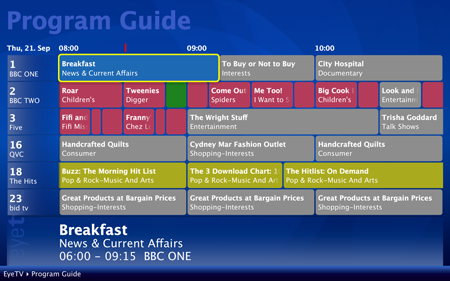
elgato eyetv hybrid digital and analogue usb tv tuner
Elgato's EyeTV: select a channel

EyeTV provides all the customary DVR features - record shows there and then, schedule recordings, pause live TV, etc. - and even allows you to edit recordings to trim out ads and bits of previous and subsequent programmes that have been grabbed along with the show you want to watch.

The software works with Roxio's Toast disc burning application, if you have it, to facilitate archiving, and it'll also reformat recordings at the push of a button for the Apple TV and iPod - and, for that matter, other playback gadgets that support the same H.264 video format.

EyeTV includes a year's subscription to Europe's TVTV.com online electronic programme guide, though it'll also pick up EPG information broadcast by digital TV channels. You can organise channels into favourites, by genre, or by whatever means takes your fancy.
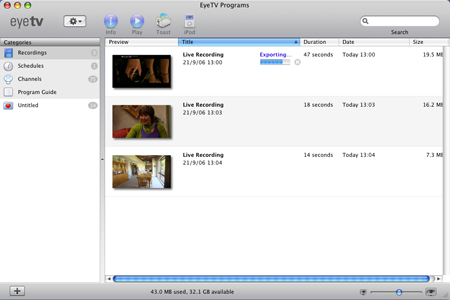
elgato eyetv hybrid digital and analogue usb tv tuner
Elgato's EyeTV: manage and export your recordings

It is, in short, the definitive TV application for the Mac and well worth the €80/$80 (£40) Elgato's asking for it. Of course, Elgato bundles EyeTV with its own line of TV tuner hardware, but it'll also work with an array of hardware from other manufacturers, including Plextor, Twinhan, Terratec, Pinnacle, Miglia and Hauppauge, so you're not tied to buying Elgato's own hardware. There's a full list of EyeTV-compatible tuners here.

Latest Comments
Anonymous Coward

Virgin Media and Elgato EyeTV 610 and

Minor correction to the article...

The EyeTV 610 does work with Virgin Media's DVB-C service in the UK (including the V+ HD broadcast). However, caution... using it won't be supported by Virgin Media! You also need a CAM... e.g. T-REX SuperModule 4.6

The Elgato EyeTV 610 can be ordered in the UK from the Elgato online store and, no, I don't work for Elgato.

0
0

There is an easier way

Get a spare Widows PC and set it up as a media server and then use the Mac as a dumb client. While there are some real world uses for a Mac (i have been told this, never seen one yet)

Mac's are just like a super car, nice to look at but rubbish to drive and useless for day to day use (just try speed bumps) where as you really can do anything with Windows PC and do it well

0
0
Anonymous Coward

You can watch as many channels simultaneously as you want...

...if your CPU can handle it **and** if they are transmitted on the same frequency. What you can't do is watch two channels or more on different frequencies unless you have two tuners (e.g. the hybrid can record two different channels independently).

0
0
Anonymous Coward

Why there isn't a built-in tuner...

Quote "...to fill the gap Apple has left, and if you want to watch analogue or digital broadcasts, satellite or cable transmissions on your Mac, you can..."

The gap is there for the very simple reason that there are so many different standards out there - does Apple include an analogue only, DVB-T only, DVB-S only, DVB-C only or mixture of tuners? And why bother when a) most people don't want a TV tuner for the computer anyway and b) there are great options on offer from third parties already out there, for people to pick what is just right for them?

0
0

Re: Matt

To view two channels at once, you will need two tuners connected to the machine. The safe way to do this is to get something like the EyeTV Diversity which has twin tuners built in. I remember reading something about EyeTV supporting two independant tuners, but I think it was more luck that it worked at the time :)

0
0

More from The Register

New Lumia 925: This, loyalists, is the BIG ONE you've waited for
Nokia veep drills high-end master plan for El Reg
US boffin builds 32-way Raspberry Pi cluster
Beowulf cluster built for the price of a single PC
Review: HP Pavilion 14 Chromebook
All roads lead to Chrome?
Borked your iDevice? Pay EVEN MORE to have it fixed by Applecare
Or scream at their hapless techies on their forums
Euro PC shipments plummet into bottomless pit of DOOOOM
11th quarter of decline, 20pc drop on last year - Gartner
Report: AT&T dropping Facebook phone after dismal sales
Turns out folks won't buy that for a dollar
Nintendo throws flaming legal barrel at YouTubing fans
All your walk-through vid revenue are belong to us
Which petite model likes a fondle and GETTING WET? Sony's Xperia ZR
Take this new mobe swimming. Just not deep, or for long, OK?
Google adds Atari Easter Egg for Breakout's birthday
Cute game born in Jobsian heart of darkness