
Netgear XEPS103 powerline power brick
Why plug two boxes into the mains when you only need one?
Regcast training : Hyper-V 3.0, VM high availability and disaster recovery
Review We at Register Hardware like powerline networking - using mains electricity cabling to send data throughout your house - very much, but an issue with most powerline adaptors is their 'one power socket, one data port' implementation.
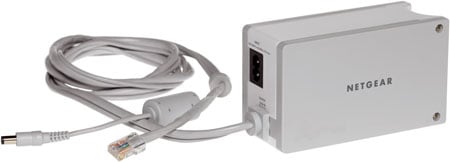
Netgear's XEPS103: it's a power brick, a powerline network adaptor
Each device you connect needs its own powerline adaptor, every one of which needs a separate power socket. These two products from Netgear provide different solutions to that problem.
The first, the XEPS103, will appeal almost exclusively to people who already own a Netgear router. Let's say you've a Netgear WPN824 Rangemax router and you want to extend it with a powerline link. Your router's power brick takes up one power socket and the powerline adaptor another. The XEPS103 simply melds AC adaptor and powerline box into one. The upshot: you get powerline networking and wireless networking both through a single socket.
Genius, really, though you have to ask why the idea has taken so long to come to market and why Netgear's not bundling these things with its routers as standard.
The downside is that combining these elements makes for a chunkier box than either adaptor on its own, so the XEPS103 is fed through a power cable rather than being plugged directly into the wall. The 12V power feed and Ethernet cable it sprouts are bonded together for convenience, splitting apart only at the end.
The XEPS103 provides power to 15 Netgear routers and switches - you can find the full list on Netgear's website - and it may work with other devices, but check the 12V, 1A feed's polarity and size carefully first - remember, you proceed at your own risk if you try this.
You don't have to connect the XEPS103 to a router, either - it will work just fine as a standalone powerline adaptor.
COMMENTS
bitrate capacity coverage against noise is the key here
Its not the size of the file here that counts, its the ability to cover the mains topology with its extreme hostile environment , with the required bitrate needed for the applications.
I have done a full meshed test in my home with the HomeplugAV 200 devices ,with everything switched on as normal and achieve at least 55mbs on every socket using Iperf UDP point to point . more than enough for a full 20mbs HD 1080i stream from my PC to DMA .
The proof of the pudding here is the robustness to cope with switches going on and off , hoovers and hairdryers and all the rest . they do have some impact but the user is unaware using Homeplugs . I cannot say the same for the non-Homeplug devices as they suffer badly under real world scenarios.
Got one of these!
Just bought one of these (simply replaced the existing PSU of my DG834G wireless router), and it was working within, oh about 2 seconds - these things are seriously impressive.
I've got this one plugged into a 4-way power strip along with HIFI, MediaPC etc, and the other one also on a 4-way power strip, along with the other PC, monitor etc. Absolutely no problems, even though they say you should use them directly in a wall socket.
And yes, Richard, streaming 350Mb/44min Divx episodes is not a problem (for me anyway)
Got one of these!
Just bought one of these (simply replaced the existing PSU of my DG834G wireless router), and it was working within, oh about 2 seconds - these things are seriously impressive.
I've got this one plugged into a 4-way power strip along with HIFI, MediaPC etc, and the other one also on a 4-way power strip, along with the other PC, monitor etc. Absolutely no problems, even though they say you should use them directly in a wall socket.
And yes, Richard, streaming 350Mb/44min Divx episodes is not a problem (for me anyway)

IT infrastructure monitoring strategies
Requirements Checklist for Choosing a Cloud Backup and Recovery Service Provider
Data control in the cloud
Cloud based data management
Agentless Backup is Not a Myth