


This article is more than 1 year old
2P Slim-Mouse
Freakish or functional: is this credit card-sized mouse worth its cheese?

Exclusive Review Manufacturer Power Positioning - aka 2P - describes the G4 Slim-Mouse as "the thinnest laptop mouse ever invented". That's not entirely true - Newton Peripherals' MoGo Bluetooth-connected rodent is just as thin as the Slim-Mouse and has been around for a little longer.
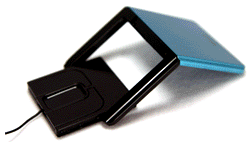
The Slim-Mouse also suffers in comparison with the MoGo because, unlike its rival, it's not a wireless product. What we can say is that its metal construction makes for what seems a much sturdier product, better able to survive life on the road. Helping it along in this respect is the leatherette wallet the Slim-Mouse comes boxed up with - alongside an A5-sized roll-up mouse mat.
But enough of the packaging. Out of the wallet, the Slim-Mouse looks like a PC Card peripheral of old - indeed, it's designed to able to fit inside a Type II PCMCIA slot, which it does, sort of. It went into the slot on our PC, but not smoothly and it still poked out a centimetre or so beyond the edge of the laptop. A bit like a Wi-Fi card.
Unopened, the Slim-Mouse is 9.4 x 5.3 x 0.5cm. The top half holds the business end - a small unit that has the optical pick-up, buttons and, in place of a scrollwheel, a trackpad - fitted between a two-tine fork. The very thin USB cable fits into a groove running into the bottom half of the mouse, which contains a spindle for the cable and the USB connector, itself just thick enough to sit inside the host PC's USB port.
With the USB connector in place at the centre of the spindle it's easy to turn it with your thumb and unpack the cable - and retract it when you're done. With the cable out, you push the optical unit a little way out to begin the Chinese Puzzle-like way you prepare the mouse for use.
The two halves of the rodent are separated by pivot cut at angle so that when the two halves are turned you end up with a V shape. With the V inverted - point upwards - you turn the optical unit so the LED is facing down, ready for use. Plug the USB cable in and you're away.
The tines of fork terminate in two spring-loaded bearings, one on either side. These run down tracks in the optical unit allowing it to be extended. Four indentations on each side lock the bearings in place so the buttons aren't constantly sliding about under your fingers.
That's the theory, at least. We found the arrangement initially too loose to work effectively and the optical unit kept falling off when fully extended. Pushing the prongs together a little helped tremedously, so there's another advantage to metal: unlike plastic, it bends.
Even so, the Slim-Mouse doesn't fit together with a James Bond gagdet quick click-click-click-and-you're-done motion, so it's going to be hard to look cool assembling one of these in front of chums, business colleagues and other folk you want to impress.
 Biting the hand that feeds IT

