The Register® — Biting the hand that feeds IT

Feeds
70%

SanDisk Cruzer Pro, Enterprise secure USB Flash drives

Pay a premium, get password protection

Review Hands up who doesn't own a USB Flash drive, purchased or acquired as a freebie? No one? We're not surprised. These things are everywhere, leaving manufacturers keen to come up with novel ideas to sell us more. SanDisk's approach: push data security with a pair of password-protected products.
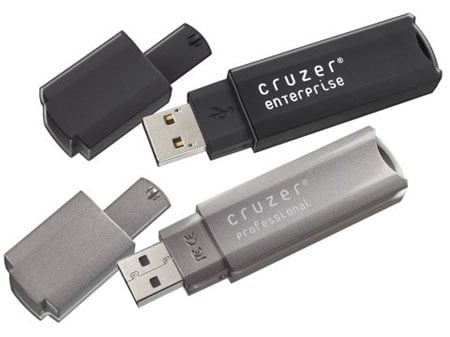
SanDisk Cruzer Pro and Enterprise

For the security minded, we have the Cruzer Professional and the Cruzer Enterprise. The Pro is the more basic of the two devices. Like the Enterprise drive, it protects data using 256-bit AES encryption, but whether you use it is left entirely to you.

Plugging in the drive for the first time is just like using any other USB Flash drive. Upon opening it up in Windows, the 'My Computer' window reveals you have the full 1GB available to you and to anyone else who gets their hands on it. Pre-installed is the user manual in PDF form - it's best to copy it off drive so you still have it after re-formatting - and the CruzerPro app.

Running CruzerPro allows you to set up a password-protected, encrypted private space just by dragging a slider to specify its capacity and, finally, entering a password. When you're done, click the 'Format' button and your safe-space is created. Double-clicking on the 'CruzerPro' icon in future allows you to open the private drive for use.

Copy over some data and it's encrypted. The protected partition has a shortcut to CruzerApp that you double-click to log out. You'll need to do this to re-access the public space on the drive - as you can only have one open at a time, each being assigned the same Windows drive letter. Personally, we'd like to have both available side by side, but that's a minor niggle.

Loading the Cruzer Pro on the Mac mounted only the public partition. The private space didn't show at all, not even as an inaccessible volume, in either Finder or Disk Utility.

Re-connecting the drive in Windows once again allows you to access the private partition by successfully entering the password. But here's a thing: the login window also has a Settings button that takes you to the formatting screen. Now, there's no way your data can be accessed from here, but what an unauthorised user can do is reset the password and the size of the private space.

Latest Comments
Anonymous Coward

Something you left out

I have tested and deployed devices like this in house, and they also have management software available for central management. This provides the ability to set policy, lock the device instead of allowing an unauthenticated user to format the device. It also provides the ability to lock or format a device that has been stolen, or lost.

0
0

Re: Admin access

Hi,

I'm not an admin, just trying to get a standard encryptable usb memory stick for my organisation.

As far as I can tell we need the "Traveller" for removable storage, any pointers gratefully accepted.

Tom

0
0

Re: Admin access

If you really are a system admin, then perhaps you should RTFM for TrueCrypt.

---

Using TrueCrypt without Administrator Privileges

In Windows, a user who does not have administrator privileges can use TrueCrypt, but only after a system administrator installs TrueCrypt on the system (or after the administrator gives the user administrator privileges). The reason for that is that TrueCrypt needs a device driver to provide transparent on-the-fly encryption/decryption, and users without administrator privileges cannot install/start device drivers in Windows.

After a system administrator installs TrueCrypt on the system, users without administrator privileges will be able to run TrueCrypt, mount/dismount any type of TrueCrypt volume, load/save data from/to it, and create file-hosted TrueCrypt volumes on the system. However, users without administrator privileges cannot encrypt/format partitions, cannot create NTFS volumes, cannot install/uninstall TrueCrypt, cannot change passwords/keyfiles for TrueCrypt partitions/devices, cannot backup/restore headers of TrueCrypt partitions/devices, and they cannot run TrueCrypt in 'traveller' mode.

http://www.truecrypt.org/docs/?s=administrator-privileges

---

Easy as that.

0
0

Admin access

Does the device require the user to have admin access to the PC it is used on?

As far as I know there is no way we can use TrueCrypt because the users need admin access and in the enterprise we don't want our users to have this access level.

If you know of a way we can use TrueCrypt as a non privileged user then let me know please.

0
0

Operating system silliness

"Only works with Windows" ... how idiotic. Does anything more need to be said? I have a LEXAR JumpDrive that has encryption software for the Mac. It cost $28 Australian. I primarily use Macs, have friends that use Linux, and keep meeting people who still use WIndows. I think that SanDisk must have hired the pointy haired boss from Dilbert and let him set this one up.

0
0

More from The Register

Microsoft reveals Xbox One, the console that can read your heartbeat
Upgrades Live service – and no always-on requirement
 breaking news
Review: Sony Xperia SP
The new mid-range marvel? Oh yes.
US boffin builds 32-way Raspberry Pi cluster
Beowulf cluster built for the price of a single PC
Dell's PC-on-a-stick landing in July: report
Wyse up, suckers, could this be a new set-side-stick?
Review: HP Pavilion 14 Chromebook
All roads lead to Chrome?
Borked your iDevice? Pay EVEN MORE to have it fixed by Applecare
Or scream at their hapless techies on their forums
HTC woes prompts 'leave now' tweet from former staffer
Chief product officer latest to bail from sinking mobe-maker
Euro PC shipments plummet into bottomless pit of DOOOOM
11th quarter of decline, 20pc drop on last year - Gartner