The Register® — Biting the hand that feeds IT

Feeds
80%
Gigabyte Odin GT 800W

Gigabyte Odin GT 800W power supply unit

The Father of the Norse Gods sends a new PSU...

UK Exclusive Review Manufacturers love to cram extra features into every part of a PC, but it comes as a surprise that Gigabyte - making its debut in the PSU biz - has managed the same trick with its new Odin GT 800W power supply.
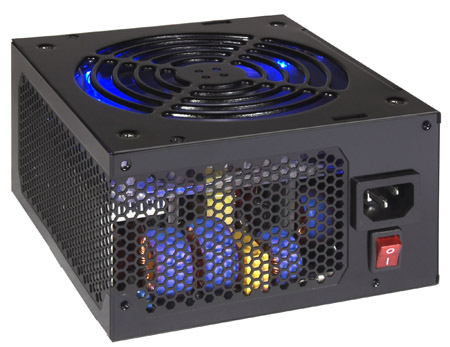
Gigabyte Odin GT 800W

Gigabyte has borrowed some aspects of the Odin from other high-end PSUs, so the casing is heavily perforated to aid cooling and the massive 140mm fan is the largest that would fit in the casing.

The cables are modular, using a system that Gigabyte calls Smart Cable Management and this is where we come across Odin's first oddity. There are four attached cables with the first supplying a 24-pin ATX connector.

The second carries both four-pin and eight-pin 12V connectors while the third and fourth are PCI Express power lines for graphics cards. These are branched to provide a two-pin connector alongside the regular six-pin plug so if you connect both in together they can power the new eight-pin connector that you find on AMD's ATI Radeon HD 2900 XT.

Curiously there are no native connectors for optical drives or hard drives so no matter what, you're sure to have to plug in at least one of the ancillary cables. There are six female connectors on the power supply. Two are colour-coded red and blue and are intended for the extra two PCIe graphics power cords. So yes, that's four PCIe connectors in total. Hello, HD 2900 XT CrossFire.

The other four cables each have three connectors, and if you plug the whole lot in you can run six SATA drives, five devices with Molex connectors and a single floppy drive. Annoyingly the latches for the connectors can block one another so you may have to unplug a couple of the cables if you decide to rearrange the cabling inside your PC.

So far, so normal, but then we come to the second oddity: the USB connection. You can either plug the connection directly to a spare USB header on your motherboard or you can connect a supplied adapter that feeds the cable out of the case to connect to an external USB port.

And why, you might wonder, would you want a data connection between your PC and your power supply? The Odin monitors both power draw and internal temperatures, much like the Bios monitors your motherboard, and the USB connection allows the Odin to pass this information to the Gigabyte Power Tuner software. That's a neat trick in itself but Gigabyte has extended the idea by adding four more connections to the power supply, all of which accept plug-in temperature probes that are 50cm long.

Latest Comments

Winterms..

It's worth doing, provided you need *nix facilities. For just browsing and RDP, either the Winterm's thinOS or Windows CE is perfectly adequate. Note that various Winterms are low power, but do not suspend to use even less power (i.e. they *always* use 20W even when off) whilst low power PCs will suspend to use even less.

A USB external drive will work, but will add about 8W+ to power requirements. A USB key is probably somewhat less. The flash on a winterm can be upgraded, although using a special NAND flash in compact flash format (*not* a true CF card) card. Extra RAM can be added to many (standard SODIMM).

The flash is updated either by parallel cable, or via TFTP; both can be patched to run Linux, and if the image is properly prepared, at quite low risk. The main problem is that the display chipset is poorly supported, and needs high CPU utilisation to work.

0
0
Anonymous Coward

Winterm

Good evening,

Ahh this is interesting, I've been thinking how to cut my power usage for a while and had this idea for a little while.

I work with Winterms at work and dare I say it Wyse's Rapport so I understand how alot of the Winterm terminals tend to work.

I've come up with an idea to use a Wyse Winterm V90 as a general download machine/general browser machine at home. It has 256MB RAM, 512MB flash as standard and a low power footprint.

I've not yet received it yet from Ebay (I won one on an Ebay auction though!). I did try the same idea with an old Compaq T20 but it had do little flash and RAM than I gave up before even starting. My idea was to use USB external drives for the storage and the flash to use a custom Debian 4 net install with just the most basic Linux install (or possibly Damn Small Linux or Puppy Linux). The V90 also seems to have a Award BIOS and allow booting off harddrive, so I could at worst install Ubuntu on a USB harddrive and do a special kernel for the V90 :)

Well I've yet to start it but it should be interesting, the only thing that worries me is that I have a feeling that Wyse put the BIOS/bootloader in the flash memory.

If anyone is interested read these:

Linux on Compaq EVO T20 HOWTO

http://www.kazak.ws/evo/

WYSE Winterm hacking - News - Linux for the 3000 series

http://winterm.gaast.net/

0
0

20W

I imagine that if you got yourself one of those Via EPIA N boards at 533 MHz, with a flash module for a harddrive and a really slick power supply you might be able to pull this off. The board itself draws about 12 Watts, though I haven't been able to find out if that is at load or idle. You might even be able to use a laptop harddrive in there, as the newer low power ones will draw less than 5 watts peak. Even so, that doesn't include a monitor, and the computer you end up with is pretty impressively slow. The Via CPUs perform slower clock for clock than a Pentium II, so you're looking at maybe a 450MHZ PII with roughly zero video power, and probably not too much ram, since larger modules draw more power.

I suppose a rather stripped Linux distro could use that to surf the web and listen to music, but as soon as you needed to compile something (Proper support of all the hardware on that board would require a kernel compile, which would likely take about 8 hours) you'd be wishing you'd just shelled out for a 35 watt computer.

Well that was fun to think about, time to go back to working on the 3 machines that are putting out a combined 1KW of heat under my desk w/o aircon.

0
0

20W? Laptops don't count... or, your power meter is broken.

Even my 486 draws a shade under 50W with a power hungry TV card in it.. The only thing that approximates to 20W is a Winterm. VIA's based systems are more along the lines of 30W+.

It's still no comparison to a modern system, running a half decent graphics card.

You'll be lucky if a decent, fast modern PC takes less than 100W idle. 20W? Don't make me laugh.

0
0

Content free?

In normal operation the Odin is effectively silent thanks to the huge fan turning at a very slow pace. When it's loaded ... well we don't know because, as you saw in the review, the load didn't reach 50% even with a Quad core CPU and HD 2900 XT. I could have used an Intel V8 test bed but it's crystal clear that the Odin is aimed at the gaming market so no doubt it would have been pointed out that the V8 is a server/workstation.

At start-up the fan runs at full tilt for a couple of seconds and makes a heck of a racket and then slows right down to a crawl. I have no doubt it could cool a small volcano.

As for efficiency, I gave the figures of 328W and 355W so the efficiency is over 90% when the PSU is barely working for its living at less than half its rated power. The only way to properly test the Odin is to hook it up to a test rig such as the one owned by Enermax. As it's the only Odin in the UK I doubt Gigabyte would have been impressed if I had let a competitor blow it to pieces to see how well it delivers 700+ Watts when we all agree that no-one needs such an outrageous amount of power.

Which is what I said in the review.

As for reading like a Press release well you're welcome to your opinion but I've never seen the word 'gimmick' used in one yet.

As for naff monitoring software I quite agree. Motherboard manufacturers seem obsessed with the latest new idea when very often what we want is something elegant and workmanlike which probably explains at least part of the success of the iPod.

0
0

More from The Register

 breaking news
Apple cored: Samsung sells 10 million Galaxy S4 in a month
Beware of South Koreans bearing Android
Microsoft reveals Xbox One, the console that can read your heartbeat
Upgrades Live service – and no always-on requirement
US boffin builds 32-way Raspberry Pi cluster
Beowulf cluster built for the price of a single PC
Review: HP Pavilion 14 Chromebook
All roads lead to Chrome?
Euro PC shipments plummet into bottomless pit of DOOOOM
11th quarter of decline, 20pc drop on last year - Gartner
Fairphone goes on sale to all
The Android handset that's PC can be yours
Nintendo throws flaming legal barrel at YouTubing fans
All your walk-through vid revenue are belong to us

Hands on with Hyper-V 3.0 and virtual machine movement

Our award-winning Regcasts have teamed up with training provider QA for the deepest of deep dives into Hyper-V, including a live demo.

Understand VM movement - just click to play, or go here for a bigger version.