


This article is more than 1 year old
Creative Live! Cam Optia AF webcam
Any which way you cam...

Review The Optia AF is Creative's 13th webcam branded under its Live! banner, but the first to feature both an auto-focus lens and a two-megapixel image sensor.
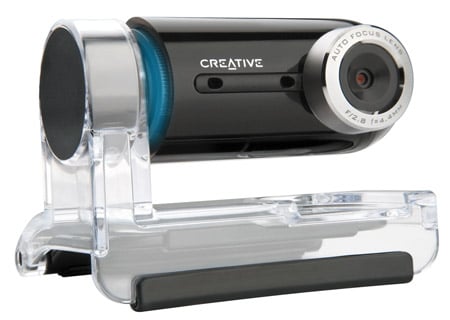
Aesthetically, the Optia AF is a handsome piece of kit. The webcam's main body is jet-black with a multi-axis swivel that allows it to be tilted up and down by up to 270°, and turned to the left and right to a smaller extent.
A blue LED band lights up around the webcam's left-hand edge to indicate when it's just been plugged into a USB port or is capturing an image. The camera clips onto a clear plastic stand which functions as monitor clip or base depending on where and how you wish to place it. A hinged clip folds out from underneath the base, but its 6cm depth and loose fit meant it sat uncomfortably on our Dell Inspiron 9400 laptop's screen and was prone to falling off. However, the rubber grips on the base meant it stayed securely on tables and CRT monitors.
A long USB lead - around 1.7m - exits from the back. The USB cable's length did become annoying after a while and so a Bluetooth version would be a huge connectivity improvement in our minds.
Clever software means that the image displayed on screen is always the right way up if, for example, you flip the camera around while it's clipped onto a laptop screen - provided it doesn't fall off, that is.
We liked the privacy mode, which lets you rotate the camera so that the lens faces downwards and slots into the stand. This deactivates the lens without the need to quit the software and also protects the lens should the webcam fall off the screen again.
The Optia AF has two microphones to the left of the lens. According to Creative, this "adaptive array" of microphones should provide "superb noise cancellation" to give us "clean and clear voice communication". But in tests we had to speak very closely to the webcam for it to pick up clearly what we were saying, but it did seem to filter out London's traffic noise when we used it near open windows.
You can turn the noise-reduction off and you can apply audio effects to your voice, such as duck and robot sounds, which kept us amused for a few minutes.
 Biting the hand that feeds IT

