The Register® — Biting the hand that feeds IT

Feeds
95%

Elgato Turbo.264 H.264 encoder

Vroom, vroom

  • print
  • alert

UK-first review Apple TV and iPod. Sony PlayStation Portable. Different devices, but united in common support of the H.264 video compression technology, part of the MPEG 4 standard. And since a lot of us own these, the need for H.264-encoded content is high. The snag: it takes a heck of a lot of processing power to produce.
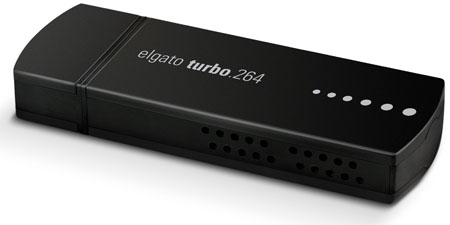
Elgato Turbo.264 H.264 transcode accelerator
Elgato's Turbo.264... the hardware

Enter Turbo.264, a dedicated H.264 encoder made by Mac TV tuner specialist Elgato. The size of a large Flash drive, Turbo.264 plugs into a free USB 2.0 slot ready to take over H.264 video encoding from the host processor.

While a Mac's CPU is a great general purpose number cruncher, the chip on the Turbo.264 was designed to do nothing but churn out H.264 video. It's a specialist to the Intel Core chip's jack-of-all-trades, and that should make it much faster. That's the theory - does it work in practice?

Installation is simple. Plug in the USB stick and drag the Turbo.264 application off the accompanying CD. The first time the app is launched, it automatically installs the necessary QuickTime plug-in code to link the multimedia software into the Turbo.264 hardware, and after a quick, optional registration process you're ready to encode video.

The connection to QuickTime means that the Turbo.264 is accessible by almost any application that uses Apple's multimedia software to encode video, not just Elgato's own - Turbo.264 shows up in iMovie, for example. Content is decoded then re-encoded by the Turbo.264, so any format QuickTime understands, even via a third-party plug-in like Flip4Mac's WMV add-in, can be converted into H.264 format. If the Turbo.264 isn't connected, you'll be told to slot it in.

The Turbo.264 application adds some formats of its own, such as the ability to drag a DVD's video_ts folder over and convert its video contents, provided they're unencrypted, of course. In practice, that means ripping the disc first, but at least the conversion to H.264 should be faster.

Latest Comments
Anonymous Coward

Same(ish) thing for PC

The same soft of gadget is available for the PC from ADS, called the "Instant Video To-Go".

0
0

Re: That's all well and good, but...

I think a lot of people are missing this part of the review...

"The connection to QuickTime means that the Turbo.264 is accessible by almost any application that uses Apple's multimedia software to encode video, not just Elgato's own - Turbo.264 shows up in iMovie, for example. Content is decoded then re-encoded by the Turbo.264, so any format QuickTime understands, even via a third-party plug-in like Flip4Mac's WMV add-in, can be converted into H.264 format. If the Turbo.264 isn't connected, you'll be told to slot it in."

I read this as I can use QT7 to export and still take full advantage of the H.264 hardware acceleration. I believe this also means that applications like Toast will benefit because it uses QuickTime to process video too.

You should also be able to sey up custom output resolutions

0
0

re: PSP users avoid

According to my take on this article You can also use QuickTime to export to H.254 and set up a custom output quality. That means you should be able to take full advantage of the PSP's video capabilities

0
0

h264

768x576 can easily be "widescreen" if it is encoded anamorphically. Your "widescreen" DVDs are encoded at 4:3 NTSC or PAL resolution but are flagged as anamorphic and the DVD player/screen just stretches then accordingly.

Also 768x576 should be okay for turbo.264 From the data sheet as long as the size is below 800x600 (and 768x576 certainly is) the image is not scaled. Only video above 800x600 will be downsampled.

I've just ordered one of these and I'm sure I'll see an improvement in encoding times even on my 2Ghz core duo iMac. As far as I can see what is happening is that Quicktime has to do the decoding to YUV from the source file in software with the GPU. There will be no way the elgato can do the decoding from the miriad formats QT supports so will have to be passed a common format (this is usually 4:2:2 YUV I think) This will then be passed to the elgato which then sends it back as h264.

Either way you look at it some of the encoding will be taken off the GPU which then allows it to have more cycles for the decoding/bus transfers etc. It really is an h264 co-processor.

RS

0
0

Re: PSPs

Joe K may be correct that the PSP's screen is higher than 320x240. However, if he hadn't installed cracked firmware on his machine, he'd be aware that you've got to encode at this resolution for Sony's bundled player to support your file - the company reserve full resolution playback for shop-bought UMDs.

0
0

More from The Register

Is the next-gen console war already One?
Microsoft’s new Xbox - and more
 breaking news
Apple cored: Samsung sells 10 million Galaxy S4 in a month
Beware of South Koreans bearing Android
US boffin builds 32-way Raspberry Pi cluster
Beowulf cluster built for the price of a single PC
STROKE this mouse to make apps POP, says Microsoft
Windows 8 Start button comes to Redmond's rodents
Nintendo throws flaming legal barrel at YouTubing fans
All your walk-through vid revenue are belong to us
Fairphone goes on sale to all
The Android handset that's PC can be yours

Hands on with Hyper-V 3.0 and virtual machine movement

Our award-winning Regcasts have teamed up with training provider QA for the deepest of deep dives into Hyper-V, including a live demo.

Understand VM movement - just click to play, or go here for a bigger version.