


This article is more than 1 year old
Don't let Windows Indexing Service know too much
Keeping index files under control

Once the service is disabled, it should not be difficult to wipe any remaining index files (*.idx, *.idq, *.ida, and *.htx), if they exist. You will have to set Windows Explorer to display hidden files and system files, as described in a previous column, in order to find the files. You can then locate them with the Search Companion (aka Search Assistant) using ".ida," ".idx," ".idq," and ".htx" as terms, and wipe them.
Of course, first you'll have to configure the Search Companion because, by default, it will not search everywhere. To configure it:
1. Go to My Computer ==> Hard Disk Drives ==> Local Disk (C:).
2. The Search companion should be visible in the left-hand pane. If it is not, click the Search icon near the top of the window.
3. Select the Companion's "More advanced options", then choose "Search all files and folders" from the drop-down menu, and tick the boxes beside the options, "Search system folders", "Search hidden files and folders", and "Search subfolders", as shown.
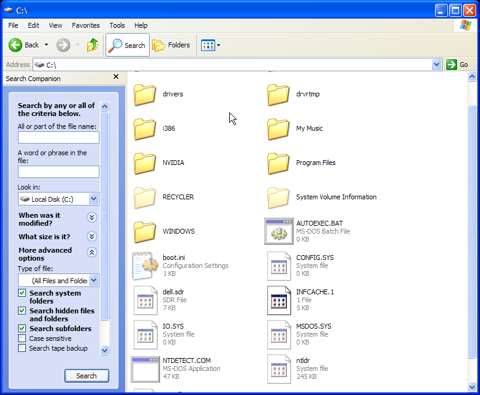
Now search on the following terms: .idx, .idq, .ida, and .htx, and wipe those files that do not obviously belong to any of your applications. It's unlikely that you will find many of these files, especially on a home system, but it's important to look for them. Wiping them may be tedious, but you will only have to do it once so long as you keep the Indexing Service turned off, or later configure it to catalogue only specific "safe" directories. The catalogue files, if any should exist, will appear in the right-hand pane of the Search Companion window. You can right-click and use your wipe utility to destroy them.
 Biting the hand that feeds IT

