


This article is more than 1 year old
Griffin ExpressCard 5:1 Card Reader
Fit a memory card reader into your reader-less laptop

Review Plenty of notebooks incorporate memory card readers these days, usually units capable of handling many, many different kinds of card. Not so Apple's Pro laptop line-up and a fair few portable PCs too. Enter Griffin's ExpressCard 5:1 Card Reader.
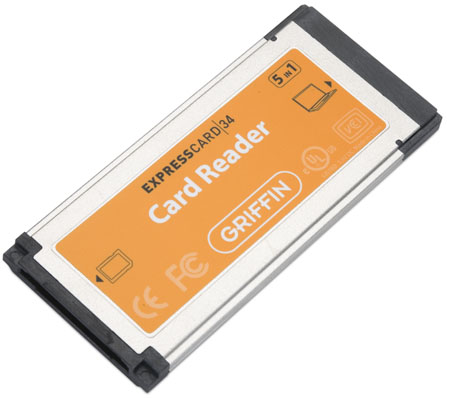
The name say it all: this a a five-in-one memory card reader constructed around the ExpressCard 34 form factor. Slip it into your laptop's Express Card slot and - bingo - you also have a way to read Memory Stick, Memory Stick Pro, SD, MMC and xD cards. And of course, with a suitable card-sized adaptor you can connect a range of even smaller memory cards too.
I tried the ExpressCard 5:1 Card Reader in my MacBook Pro's woefully underused ExpressCard 34 slot. I had some difficulty getting it to read cards at first, but I think this is a laptop issue rather than a fault in the card, as I've had problems getting the machine to recognise other ExpressCards at times.
Once the card was visible to the operating system - you can tell because an inserted memory card mounts on the desktop almost immediately - I had no problems swapping cards in and out.
That said, some care is needed, as both the memory card and the ExpressCard are spring-loaded and it's a little too easy to pop the wrong one out. Again that's not the fault of the ExpressCard per se.
And it's a very minor issue. The ExpressCard 5:1 Card Reader registers with the host as a 480Mbps USB 2.0 device so copying files back and forth is a speedy business. The ExpressCard fits flush with the edge of the MacBook Pro, so it really is like having a built in card reader.
You might say having one is unnecessary in this era of (almost) ubiquitous USB cabling, but if you're a digital camera, MP3 player, mobile phone and/or PDA user and your device's memory card formats are compatible, the ExpressCard means you've one or more fewer cables to carry when you're travelling.
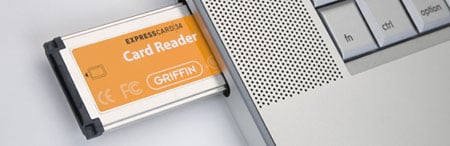
That wins my thumbs-up, as does the fact that, unlike an external card reader, the ExpressCard 5:1 Card Reader can be kept safely tucked inside your notebook. So that's one less box to carry too. Personally, I'd pay extra for that. For folk on a budget, however, no-name USB-connected external units are much cheaper.
Paying more for the convenience the ExpressCard 5:1 brings is a subjective decision: I'd pay the premium, someone else might not. Functionality is another matter, and the ExpressCard 5:1 loses points for failing to accept the new generation of SDHC cards. While it would happily mount the SD, MMC and Memory Stick Pro cards I tried, it wouldn't connect the 4GB SanDisk SDHC product I tried. That's unacceptable in a card reader as new as this and priced where this one is. Worse, it stopped the unit reading any other kind of card until I'd restarted the Mac.
Verdict
Finally, a use for your MacBook Pro's ExpressCard bay. And if you've another type of laptop then you can rid yourself of all those USB cables and dongles that impede the traveller. Unless you're using SDHC cards, of course...
 Biting the hand that feeds IT

