The Register® — Biting the hand that feeds IT

Feeds
80%

Griffin Elevator laptop lift

Put your notebook screen on the right level

Agentless Backup is Not a Myth

Review Griffin calls the Elevator a "space-saving laptop stand". I'm not sure about "space-saving", but it's unquestionably something you might very well want to sit your notebook on, particularly if your neck's giving you grief.
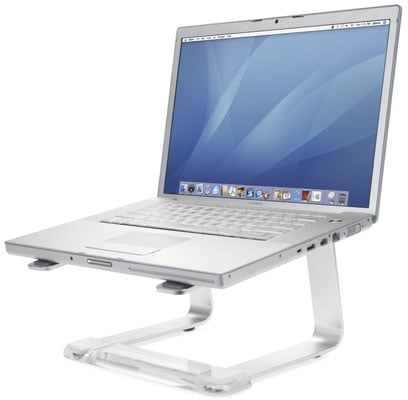
Griffin Technology Elevator notebook stand

The elevator comprises a pair of U-shaped angular metal bars and a clear plastic base into which both bars slot. The fit's sufficiently snug to keep the Elevator together but not so tight that you can't disassemble it should you need to.

The base of the bars and the holder both have sturdy rubber feet to prevent the rig sliding around the desk, while the bars' upper surfaces have long, flat rubber pads to stop your notebook slipping off. There's certainly plenty of friction to be felt if you try and move either laptop or Elevator, and I had no concerns that my 15in MacBook Pro would drop onto the desk.

Incidentally, the bars are spaced far enough apart to allow you to hold them with your fingers as you grasp the sides of the notebook, allowing you to pick both up together if you want to move to another desk.

Customer Success Testimonial: Recovery is Everything

Latest Comments
Anonymous Coward

Not getting one of these...

... not listed as being compatible with Vista. According to their website, it's only compatible with Mac OS X versions 10.3 and 10.4 and Windows XP.

Well that's saved me £30 then.

0
0

Perhaps Ergonomic?

".for 2 u-shaped bits of metal and a plastic bar, then? There's no height or angle adjustment, which makes it an ergonomic no-no as far as I'm concerned. Kensington do it better - for a few quid more, you get full height and angle adjustment, and a 4-port USB2 hub.

Nick"

Why would you need to adjust the angle? You should never be using the keyboard when you have a laptop on such a stand because that makes the keyboard too high. You need an external keyboard and mouse to use it properly.

That said, you should be able to adjust the height, as you definatly can't stack them.

IBM thinkpad users wont think much of it either, getting your thinkpad dock on the top of that won't work too well.

I do agree though, £30 is a bit steep.

0
0

The logitech Alto is cooler

The Logitech Alto elevates the laptop but also provides a full-size keyboard (which can fold out of the way) and a USB hub so you can have a mouse permanently plugged-in too. Sort of like a docking station with a convenient screen height.

We bought one to evaluate a few weeks back. Now we've got a dozen of them.

0
0

More from The Register

Samsung Galaxy Note 8: Proof the pen is mightier?
Sammy’s iPad Mini killer has a stylus to stab other rivals too
Microsoft lures buy-curious vixens, corduroys with a cheap fondle
Surface slab sales latest: Will no one rid Ballmer of these turbulent tabs?
First look: iOS 7 for iPad
No, Apple hasn't released it yet, but that doesn't stop intrepid devs
 breaking news
Curtain drops on Apple Store ahead of WWDC: What lies behind?
Steve Jobs watching from on high. No pressure, lads
 breaking news
Cold, dead hands of Steve Jobs slip from iPhones: The Cult of Ive is upon us
Billionaire biz baron's death clears way for uber-shiny iOS 7
Airbus imagines suitcases that find themselves
Point your mobe at your smalls to track their every move
Surprise! Intel smartphone trounces ARM in power trials
Tests show equal performance while sipping significantly less juice
Samsung plans LTE Advanced version of Galaxy S4
1Gbps download capability could stiffen drooping S4 sales forecasts
Apple said to be 'exploring' 5.7-inch iPhone
Who's the copycat this time, Mr. Cook?