


This article is more than 1 year old
Apple iPod Shuffle 2G
Life's still random, just smaller...

Preview The first iPod Shuffle was something of a surprise. Apple had already said it didn't think too much of Flash-based, low-capacity players, though that's just what the Shuffle was. It didn't even have a screen, unlike so many of its rivals, forcing many an observer to wonder who'd buy the thing. People did though, and the compact player proved remarkably popular...
Did Apple meet a need, or were consumer too awed by the iPod brand? Maybe a little of both, but mostly it hit the right price point. Whatever, the Shuffle found its niche. Even when Apple shipped a comparably capacious Nano, it couldn't bring itself to drop the Shuffle. Quite the reverse, it's since gone on to redesign it completely, this time focusing on getting the size down to pitch the product, true or not, as the world's smallest digital music player.
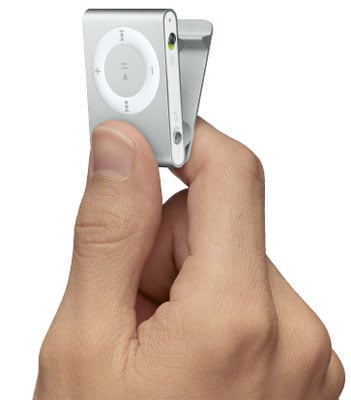
The Shuffle ships in the same clear plastic case as the second-generation iPod Nano, so expect to have to download iTunes from Apple's website if you don't have it already. Hidden behind the player are a pair of Apple's old-style iPod earphones - oddly, not the new set the debuted with the 2G Nano - foam covers, the customary quick-start guide and - for the first time in ages - a bundled dock.
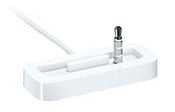
This is no philanthropy on Apple's part, a bid to save the Shuffle 2G buyer a further $19 on an accessory, but something of a necessity. The Shuffle slots sideways into the dock, locking onto a 3.5mm earphone jack integrated into the cradle. The dock doubles up as a USB cable, as you'd expect, but this time the player's earphone socket connections are used for data transfer and to feed the battery.
Given the size of the Shuffle, it's a clever solution. That said, I miss the integrated USB port - look, ma, no wires - of its predecessor. Still, I'd have preferred Apple to build a mini USB port into the player as these are always going to be more readily available than USB-to-3.5mm cables and/or docks. Presumably, Apple decided it was more cost effective to bundle the non-standard dock with the Shuffle than engineer a tiny USB port. Or maybe it just thought users would prefer a dock. Well, this user doesn't, not for this kind of device. I don't want to have to take the dock with me when I travel, and with the old Shuffle I didn't even need to take a cable.
There's another downside: speed. Apple's website simply notes the Shuffle's need for a "USB port". Not USB 1.1. Not USB 2.0. Just USB. How come? The Shuffle's data transfer rate is faster than 1.1, slower than 2.0, preventing Apple from associating it with either. Tests suggest you should get around 36Mbps - three times USB 1.1's 12Mbps but a lot less than USB 2.0's 480Mbps.
 Biting the hand that feeds IT

