The Register® — Biting the hand that feeds IT

Feeds
90%
Akasa_NDAS_tn

Akasa Integral P2 LAN

Easy to use networked storage

Review Network attached storage – or NAS as it’s widely known – isn’t the easiest thing to set up, but it can be very useful, especially if you want to be able to share data between several computers in an easy and affordable manner. Enter NDAS - Network Direct Attached Storage – a much simpler way of getting shared storage onto your network. The Akasa Integral P2 LAN is one of the first products to hit the UK market, but will it live up to the promises of NDAS?

The Integral P2 LAN is a DIY solution, so you have to bring your own hard drive. This means that it’s fairly affordable and you’re in control of how much storage you want to fit. It’s also easy to upgrade the drive later on. The EPN2NDAS is available in three colours, black, blue or silver. It looks like any ordinary external 3.5in hard drive case at first inspection, but with the difference of having an Ethernet connect at the rear as well as a USB 2.0 connector. There’s also a power switch and a power connector for the supplied power brick around the back.

All this is rather basic stuff, but you don’t normally get NAS enclosures with USB connectors that allow you to directly attach them to a host computer. This is the first advantage NDAS has over NAS, you can use it with any computer that supports USB storage devices without any drivers or a network. This is because the hard drive inside the NDAS enclosure doesn’t use a proprietary file system like most NAS devices. Instead it uses FAT32 or NTFS depending on how you format the hard drive once installed.

Fitting a hard drive inside the Integral P2 LAN is a matter of removing two screws, opening the drive case, fitting the hard drive, attach the IDE and power cables, bung it back in the box and off you go. Two things here though, first of all I would’ve liked to have seen a SATA connector internally, as it would make it much easier to fit the drive. Secondly, there is a cable that runs to the front of the case which power the logo on the front of it, this gets snagged quite easily and can easily get cut if you’re not careful when you install the drive.
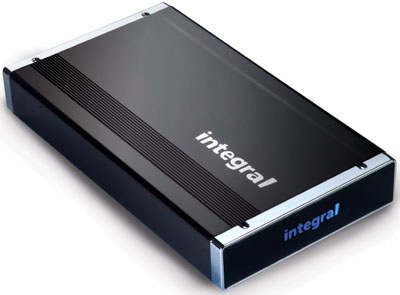
Akasa_NDAS

Installing the drive on a network is simply a matter of plugging in a network cable and installing the supplied drivers on the CD. Akasa supplies drivers for both PC and Mac and it is just as easy to install on either platform. Once the software is installed you have to launch the NDAS application and enter two codes. The first one finds the drive on the network and makes it appear as another hard drive in your system, while the second code gives you write access to the drive.

It’s by far the easiest way of setting up a networked hard drive, but Ximeta, the company behind NDAS also claims much better performance compared to traditional NAS devices due to less overheads and more direct access to the data. To be honest, I didn’t have a NAS drive to compare with, but NDAS is still slow compared to connecting up the Integral P2 LAN over USB. But judging from past experiences with NAS devices, it seemed like NDAS was zippier when copying large amounts of data.

Another advantage NDAS has is that you can attach two or more drives to your network and create a RAID array, which is useful if you need data security. This is something you can’t do with a single drive NAS device, so you would have to invest in a more expensive device straight away.

Simplicity is the beauty of NDAS and as long as you don’t mind fitting your own hard drive. Although this is the first NDAS product I’ve encountered, I’m already converted. Hopefully Ximeta will bring out Linux support in the future for NDAS, but currently this is only for Windows and Mac users. Price wise the Integral P2 LAN should set you back around £54 inc VAT, which is fairly reasonable for what you get for your money.

Verdict

A simple to use network attached storage device, something you don’t find every day. NDAS is the way to go if you want an easy to use networkable storage device that you can also use away from a network environment.®
Latest Comments

Too much money, not enough innovation

I've a similar NDAS box. Where this one cost 54 Pounds Sterling, mine cost 59 US dollars - which I'm given to understand is quite a bit less dosh.

No drivers are needed with the one I have (I won't mention the brand name because I don't want to come off as a shill), and while it does support a direct USB connection, that's not why I bought it. It's meant to be attached to the network, and it's being used pretty constantly by two humans and a half-dozen unattended servers, with simultaneous read and write operations.

Frankly, anyone who can't figure out how to hook up a network cable and then query the DHCP server to find out the device's IP address (or do a MAC address lookup) has no business trying to operate a network. If you didn't know how to use that funny guage with the "kph" markings on it in a car, you shouldn't be driving, either. These are very basic parts of operating a network.

Requiring proprietary drivers, as Akasa does, is in my opinion merely a Microsoft-like attempt to lock the user into continuing with the same brand in future; it's meant to discourage buying more versatile, less expensive (and probably more reliable) products from other makers.

0
0

RE:

Right,

NDAS is more of a solution for home usage and I didn't experience any problems during the time I used it. It's not a solution for everyone and I don't think i suggested this. As I was only sent one enclosure and only had one spare hard drive I wasn't able to test the RAID ability or how well it works, but I would think it would increase the traffic on your network as it would have to copy the data to both drives at once.

It might be worth having a look at Ximeta's site for more info, although there isn't a whole lot there - http://www.ximeta.com/technology/ndas/technologie1_en.php

And of course there would be a performance degradation with multiple users using a single drive, this is always the case, try sharing a hard drive in your PC over a network and have multiple users accessing it...

0
0

Explanation

I think there is some information lacking re the differecence between NDAS and NAS.

NDAS makes the drive appear as if it is directly attached to the machine and transmits all the raw data it would transfer across a USB port across the Ethernet.

This has severe limitations which have not been pointed out here and I think haven't even been examined or encountered.

The primary limitation for a mixed platform workgroup is that only ONE person can write on the box at a time!. I think this is quite fundamental.

If it is on an all windows network simultaneous writes can be performed but I wonder what it's performance impact would be in this situation.

Page 14 from it's manual:

http://www.akasa.co.uk/pdf/installation_manuals/P2lan_manual_PC.pdf

States:

WARNING:

DO NOT perform disk operations (format, partition and chkdsk) when multiple PCs have the INTEGRAL

LAN drive mounted.

The INTEGRAL LAN device can be formatted, partitioned, chkdsk, aggregated or mirrored when ONLY

one PC is connected.

Multiple-OS sharing:

• The INTEGRAL LAN can be shared by a mixed

of ME/2000/XP and Mac computers

• Multiple computer can have READ ONLY access

simultaneously

• WRITE ACCESS is assigned to one computer at a

time and is passed from one computer to another

Multiple-Write sharing:

• Windows XP/2000 only network environment

• Multiple computer running XP or 2000 can

have READ and WRITE access simultaneously

It does have some interesting capabilities because of this though. It could be used on an exchange server to do certain maintenance tasks that demand a locally attached drive (this would be the only way to do it over the network). Tasks such as Offline defragmentation.

Also what appears to be flexibility of RAID and that it supports native file formats is probably a result of one thing - that it is directly controlled by the host (hence the D in NDAS). It doesn't actually support or use any file system per se - it doesn't care as it doesn't manipulate it. All the circuitry in this box is doing is just transmitting the signals that would normally come through USB through TCP/IP ethernet.

Another thing to consider if considering the RAID aspect - as it is effectively a direct drive setting up two of these devices on the network to form a RAID mirror or RAID 1 does it create twice the data over the network as the host itself is doing the RAID?

These are the things that I would expect to see tested. Can we have another review/test please??

0
0

Re:

It's completley passiv, so there's no noise at all except that produced by the hard drive.

And NDAS is hardly backwards, as you need to network configuration knowledge, which makes it the ideal solution for those that don't like or know how to set these things up.

0
0

Basic questions...

I worry that this review seems like sales blurb rather than a consideration of the options available.

I've been looking for something like this to use at home and there are various similar options (Buffalo, WD) - although most offer USB hosting rather than the opportunity to connect to a PC via USB. But isn't that more useful and appropriate? And also as another commenter said, key questions are how loud it is and whether it turns off the HD after a period of non-use to save power. Just reading amazon I came across much discussion of that. As for standards, the WD use of CIFS (which is linux supported) and DHCP etc. seems a good option - obviously this device is very proprietary from a non-major-name manufacturer and that is a concern if I'm trusting my data with it. The support for mirroring is mentioned, but I'd like to hear the results of trying it; I'd like this technology to set up a super-safe (from burgulars too) data vault in the loft or something. The paragraph on RAID seemed just... confused.

For me, a disappointing review.

0
0

More from The Register

Android is a mess and needs sprucing up, admits chief
Can Google really fix it? It isn't in control any more
New Lumia 925: This, loyalists, is the BIG ONE you've waited for
Nokia veep drills high-end master plan for El Reg
Android device? Ooohhhh, you mean a Samsung phone
Koreans nabbed nearly all the Q1 profits – more even than Google
Review: HP Pavilion 14 Chromebook
All roads lead to Chrome?
Borked your iDevice? Pay EVEN MORE to have it fixed by Applecare
Or scream at their hapless techies on their forums
Euro PC shipments plummet into bottomless pit of DOOOOM
11th quarter of decline, 20pc drop on last year - Gartner
MIT takes battery-powered robot cheetah for a gallop
Biomimetic big cat needs no power cord, just a walker