


This article is more than 1 year old
Sony Ericsson P990i smart phone
How the mighty has fallen...

Review Announced almost a year ago, Sony Ericsson's flagship smart phone, the P990i, is finally making its way into the shops. Over four generations - the first, a larger device codenamed 'Pamela' never made it to market - the P series has become the single most popular smart phone design in the world, largely because Sony Ericsson succeeded in combining a multi-tasking pen tablet PDA with a phone that felt very natural to use one-handed. This popularity is helped, of course, by Sony Ericsson only making one a year rather than throwing dozens of models at the market, like rivals Nokia, Motorola and Samsung...
From the outset the P800 attracted an enthusiastic fan base - Steve Jobs was heard raving over it - and it represented an unusual marriage of the best of Swedish design and engineering with Sony detail. Few phones, for example, come with a screwdriver as standard, allowing you to remove the flip completely and convert the bulky phone into a sleek PDA tablet. The company also showed it was listening to the right kind of advice, fixing many of the usability issues of the P800 in the P900 and P910 models, without cluttering it up with gimmicks. Here was a phone then, that was appealing to corporate users - a solid technical foundation with a screen large enough for serious applications such as GPS - that still didn't frightening consumers. A rare thing indeed.
This year, Sony Ericsson has branched out with three phones based on a much-changed version of the P-series user interface, UIQ 3.0, and the P990i is the second of these we've looked at. It's had a troubled gestation, and as we discovered, a troubled birth too.
First impressions
At first sight, the P990i looks almost identical to the P900 - with the very welcome return, for this reviewer, of the scary-looking thin horizontal bars on the phone keypad. The only major difference is the addition of a five-way D-pad, and a more bulky camera housing on the back, accommodating the two megapixel camera. The reassuring Back and Clear keys that have adorned Ericsson phones for a decade are still there, joined by a number of new buttons. There's a dedicated media button, an additional Back key on the side of the phone, and a new hardware keylock slider. Quite why these are needed soon becomes apparent - this I'll examine in more depth when in the usability section.
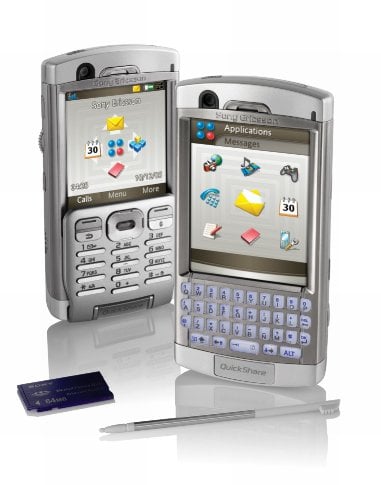
It's only when you open up the flip that you see the major difference: a 35-button keyboard. This phone screams to be turned into a BlackBerry. The resolution remains the same as before, at quarter-VGA (320 x 240), which back in 2002 was considered extravagant. But with so many communicators and satnav PDAs sporting VGA (640 x 480), it's a lost opportunity: navigation, photos and videos, and even messaging all benefit from a larger screen.
Radio wise, the phone supports 3G W-CDMA and WLAN, but not EDGE, or in this model, the 850MHz used by former TDMA networks in the Americas. Wi-Fi can be turned off explicitly - in fact, the manual recommends that you do so after a session - but it can also be activated in flight mode. Bluetooth has been upgraded and infrared retained, and for the first time the P-series includes an FM radio. USB has also been spruced up, to support full-speed USB 2.0. There's 60MB of memory on board, of which around 15-20MB is usable for applications.
The vanilla app bundle, before operator branding, includes the Opera browser and a business card scanner. The P990i continues to support the Memory Stick Pro Duo card format, and can handle cards up to 8GB in size. Its sibling, the M600i, instead supports the smaller M2 Memory Stick Micro.
 Biting the hand that feeds IT

