The Register® — Biting the hand that feeds IT

Feeds

Windows on Mac: BootCamp vs Parallels Desktop

How to run the 'other' operating system...

Review Almost as soon as Intel-based Macs were available to buy, clever coders were trying to figure out how to run Windows XP on them. Mac OS X not good enough for you, guys? Well, in some cases no, it's not. Mac OS X may be the better product - discuss... - but Windows has access to far more software applications and hardware toys that the Apple operating system does. From gamers to software developers to business users, there are solid reasons why a Mac user might want to run the 'other' operating system.

And not just Windows XP. Running Linux has always been an option, thanks to the sterling work of LinuxPPC coders stretching back more than ten years, but now Mac users have the chance to sample some of the more modern alternatives running on x86 CPUs, like Ubuntu. Then there are the leftfield options like OS/2 and, a personal favourite, the BeOS, now defunct as a commercial product but available as the Intel-only Zeta.
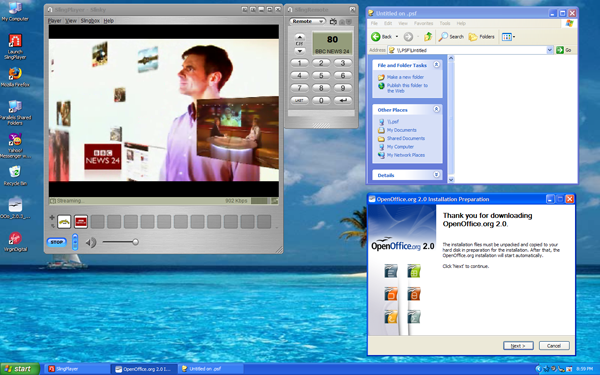
windows on mac

But there's a basic question that needs to be answered before we can all enjoy tinkering with alternative operating systems on or Macs: how is this duality to be achieved? Both Windows and Mac OS X access hardware resources in different ways, so there's no way literally to turn a Mac into a PC. You can't format the hard drive and install Windows on top of it. There have been hacks to make this possible and to allow an Intel-based Mac to play host two both Mac OS X and Windows, and they've been followed up by more commercial tools. This month, Apple updated its offering, BootCamp, while a small company called Parallels released the final version of its own Windows-on-Mac tool...

Latest Comments

Sharing of Files?

Something I've been wondering for a while.. is it possible to share files (eg: Outlook mailbox, my documents, favourites, etc) across both operating systems?

What are the issues around such sharing of content? compatibility problems?

Being new to Mac, I dont know how shareable content is with Windows machines, and this is definitely somethign that is important to me should i make the switch to Mac (somethign i'm seriously considering now that i can still use Windows for development work.. i dont think you can get MS Visual Studio for Mac... or can u?)

0
0
Anonymous Coward

Missing the Point

I really don't think the author of this article really understands the power of Parallels. As an IT specialist I routinely run multiple virtual machines simultaneously on my MacBook Pro. I've simulated/built LANs, compiled applications and tested on indiviual virtual machines or in groups of up to 4 simultaneously.

Yes host only networking is the default, but multiple host only machines can talk to each other when hosted on the same physical hardware. This is incredibly useful. I run a workstation dedicated to windows for things at work that OSX can't yet do, like run old crappy dos and win32 applications from the network (Darwine and Crossover are up and coming, but not there yet for me), and that one is set to "bridged". With bridged networking, the virtual machine appears to the outside as its own unique computer. And, yes, mulitple bridged machines can be run on the same physical hardware, visible to each other and the world.

As for boot camp, give me a UNIX kernel like OSX and parallels on top of it instead, for everything, anyday, always. The ONLY time I can foresee a need for bootcamp is for games, when 3D matters, and when a port isn't available yet for OSX natively. Given time, I see 3D added to Parallels as well. For now, the few games I care to play have been ported to OSX already. Ditto on high end graphics and video products.

As far as performance goes, think snappy. It is "near native", nothing at all like the Virtual PC days. The fact that the author discounts due to the fact 3D video isn't available has missed the boat entirely in my opinion. These macintel machines offer the best of everything when configured with Parallels desktop and sufficient RAM, and they are reasonably priced as well for the flexibility, performance, and security you get. I've stopped using my other PCs, Linux, BSD, and XP. I have access to as many as I want for free. The experience is that good.

0
0

Repair disk permissions

Quote from the article: "Reports from folk who've tried it already suggest that it's a good idea to verify your hard drive and repair file-access permissions before running BootCamp."

Of course they did. It's part of the Mac Voodoo, that. Anyone who wants to appear knowledgeable but has no clear idea of what they're talking about will recommend one or more of: repair permissions; clearing PRAM; installing software updaters via the combo rather than incremental package. It certainly wouldn't help in this situation and almost never does at any other time, but it's part and parcel of The Mac Experience ;-)

0
0

Parallels rocks

Parallels is an amazing piece of software, and unlike the reviewer I can recomment it wholeheartedly. It sounds, from the problems he had swtiching between full-screen Windows and OSX, that either he had an old, pre-release copy of Paralells, or he didn't bother to read the instructions properly, because full-screen switching is built-in.

In addition, in the months I have been using Parallels on my intel iMac, I have never had any problems with lagging mouse cursors, or disappearing GUI elements, and it sounds to me like - again - the reviewer failed to follow the instructions to install "Parallels Tools" once he had finished the Windows installation process.

Parallels has worked for me flawlessly. I have never, ever, had it crash, and I use it daily to run my stock trading software. Performance is excellent, and much faster (providing 3D graphics aren't required) than any Pentium-based PC. The machine takes full advantage of the Core Duo VT-mode (which again mistakenly the reviewer says might be something for future versions).

Unless you want to play hard core 3D games (in which case use Boot Camp), Parallels is the best of both worlds: instant switching between OSX and Windows, on the same machine, with virtually no loss of performance. On my iMac, Parallels running Windows 2000 and my stock trading software uses up just 21% of total CPU capacity, according to the Activity Monitor. That's pretty amazing.

In short, Boot Camp is a complete waste of time, unless you simply have to have access to 3D graphics. For the 90% of the rest of the world who don't Parallels is the absolute best solution - especially as you can cut and paste between the two OS environments and set-up shared folders. For $80 (and assuming you already have a copy of Windows from an old PC lying around) you can run Windows on your Mac, with virtually no sacrifices. The reviewer grossly underplayed the usefulness of Parallels, and overplayed its very few shortcomings IMO. Parallels beats the pants of VMware in terms of usability, stability, and resource requirements. Macs running OSX, hosting other OSs via Parallels, really are the most broadly compatible and versatile computers on the planet now.

0
0

Linux on MacOS

Maybe I'm missing something, but can anyone suggest a decent reason why anyone would want to run Linux on top of MacOS, which is itself based on a BSD back end??

0
0

More from The Register

 breaking news
Microsoft reveals Xbox One, the console that can read your heartbeat
Upgrades Live service – and no always-on requirement
US boffin builds 32-way Raspberry Pi cluster
Beowulf cluster built for the price of a single PC
Review: HP Pavilion 14 Chromebook
All roads lead to Chrome?
Euro PC shipments plummet into bottomless pit of DOOOOM
11th quarter of decline, 20pc drop on last year - Gartner
Fairphone goes on sale to all
The Android handset that's PC can be yours
Nintendo throws flaming legal barrel at YouTubing fans
All your walk-through vid revenue are belong to us
Startup hires 'cyborg' Mann for Google Glass–killer project
3D augmented reality specs coming your way this year

Hands on with Hyper-V 3.0 and virtual machine movement

Our award-winning Regcasts have teamed up with training provider QA for the deepest of deep dives into Hyper-V, including a live demo.

Understand VM movement - just click to play, or go here for a bigger version.